Last Updated or created 2026-06-30
Use a web server with a simple php script.
UPDATE 20260612 ! no more DNS needed
UPDATE 20260626 Fix for mobile
Add a search engine to your browser
There are some mobile browser where http://IP/?blah won’t work.
A key-value is needed!
NOTE! .. change to http://IP/?search=%s
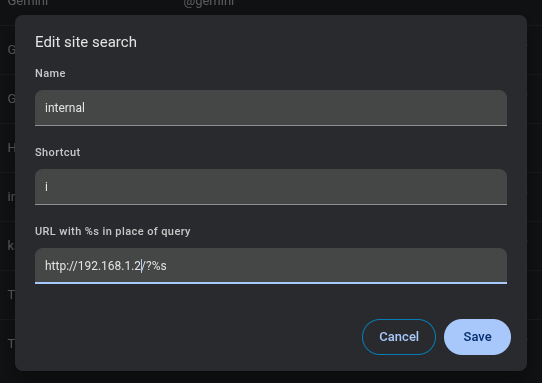
Change index.php to :
<?php

// OLD $query = $_SERVER['QUERY_STRING'];
$query = $_GET['search'] ?? '';


$redirects = [
    'torrent' => 'http://192.168.1.3:9091/transmission/web/',
    'nzb'     => 'http://192.168.1.3:8080/',
    'ha'     => 'http://192.168.1.4:8123/',
    'proxmox'     => 'https://192.168.1.250:8006/',
    'paperless'     => 'http://192.168.100.200:8010/',
    'nodered'     => 'http://192.268.1.5:1880/',
    'namazu'     => 'http://192.168.1.6/cgi-bin/namazu.cgi',
    'news'     => 'https://nu.nl',
];

if (isset($redirects[$query])) {
    header("Location: " . $redirects[$query], true, 302);
    exit;
}

http_response_code(404);
echo "Unknown service";
Now in your browser address bar type:
I nzb
To be redirected
WARNING .. OLD
<?php
$host = $_SERVER['HTTP_HOST'];

$redirects = [
    'torrent.local'     => 'http://192.168.1.1:9091/',
    'nzb.local'     => 'http://192.168.1.1:8080/',
    'squeezebox.local'  => 'https://192.168.1.2:9000/',
    'squeeze.local'  => 'https://192.168.1.2:9000/',
];

if (isset($redirects[$host])) {
    header("Location: " . $redirects[$host], true, 302);
    exit;
}

http_response_code(404);
echo "Unknown host";
Add your webservers IP number to your local DNS server or hosts file
192.168.1.4 torrent.local
192.168.1.4 nzb.local
192.168.1.4 squeeze.local
192.168.1.4 squeezebox.local
Now you can use http://nzb.local in your browser and you will be redirected to http://serverip:port
No need to remember IP numbers or ports