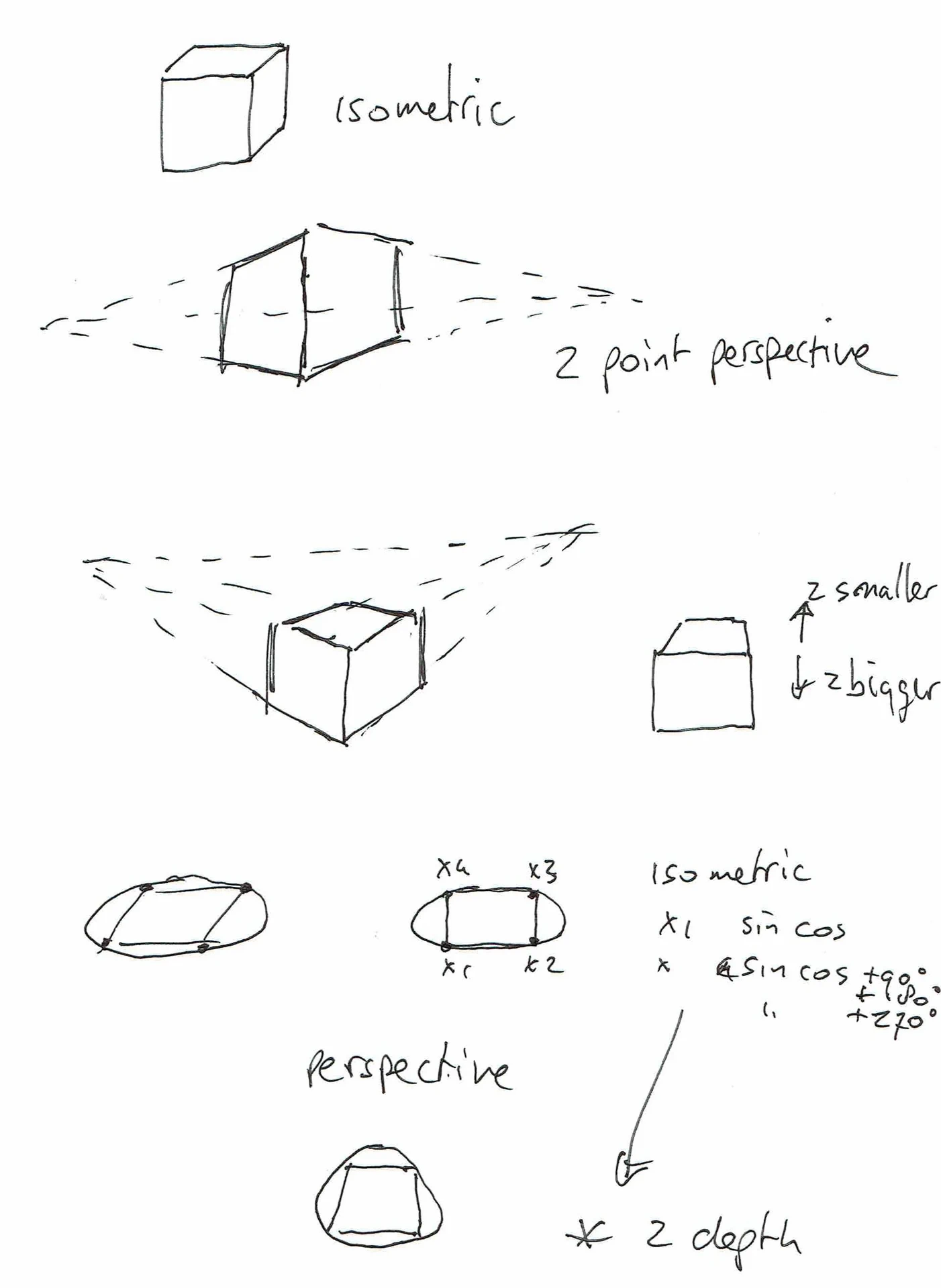
I’ve posted this last time
These are my experiments using python.
You can see that I had some trouble with projecting depth in some of these animations.
The sliders helped me to understand what was going on.
I’ve used some information from these books.
Code (much like my BBC Acorn Basic program)
import tkinter as tk
import math

def rotate(p, ax, ay):
    x, y, z = p

    # rotate around X
    cy, sy = math.cos(ax), math.sin(ax)
    y, z = y * cy - z * sy, y * sy + z * cy

    # rotate around Y
    cx, sx = math.cos(ay), math.sin(ay)
    x, z = x * cx + z * sx, -x * sx + z * cx

    return x, y, z


def project(p, blend):
    x, y, z = p

    # isometric
    iso_x = x - z
    iso_y = y + (x + z) * 0.5

    # perspective
    d = 4
    f = d / (d + z)
    per_x = x * f
    per_y = y * f

    # blend projections
    px = iso_x * (1 - blend) + per_x * blend
    py = iso_y * (1 - blend) + per_y * blend

    return px, py

CUBE = [
    (-1, -1, -1), (1, -1, -1), (1, 1, -1), (-1, 1, -1),
    (-1, -1,  1), (1, -1,  1), (1, 1,  1), (-1, 1,  1)
]

EDGES = [
    (0,1),(1,2),(2,3),(3,0),
    (4,5),(5,6),(6,7),(7,4),
    (0,4),(1,5),(2,6),(3,7)
]

root = tk.Tk()
root.title("Rotating Cube")

canvas = tk.Canvas(root, width=400, height=400, bg="black")
canvas.pack()

slider = tk.Scale(root, from_=0, to=1, resolution=0.01,
                  orient="horizontal", label="Isometric / Perspective")
slider.pack(fill="x")

ax = ay = 0

def draw():
    global ax, ay
    canvas.delete("all")

    blend = slider.get()
    points = []

    for p in CUBE:
        r = rotate(p, ax, ay)
        x, y = project(r, blend)
        points.append((200 + x * 80, 200 + y * 80))

    for a, b in EDGES:
        canvas.create_line(*points[a], *points[b], fill="white")

    ax += 0.02
    ay += 0.03
    root.after(16, draw)

draw()
root.mainloop()