Welllll .. kinda .. blender using cloth simulation.
I started using cloth simulation to get a blanket “natural/using folds, so not perfect” on a bed scene.
Very cool

Welllll .. kinda .. blender using cloth simulation.
I started using cloth simulation to get a blanket “natural/using folds, so not perfect” on a bed scene.
Very cool
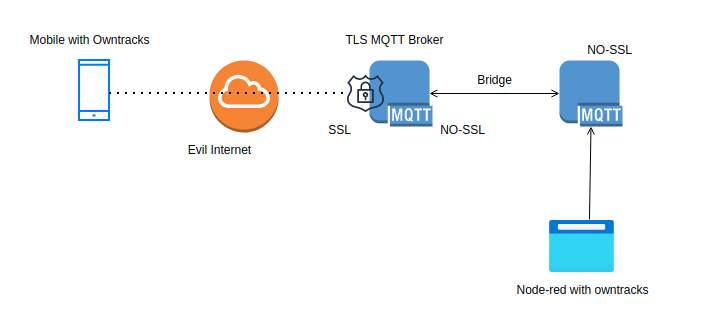
A little diagram explaining what i’m using to get a secure mqtt owntracks setup. (reinstall)
Mobile connects with certificates and password to my server in DMZ using port 8883 (no sockets activated at the moment)
Mqtt server in DMZ connects via a bridge to my internal mqtt server. (Both Mosquitto)
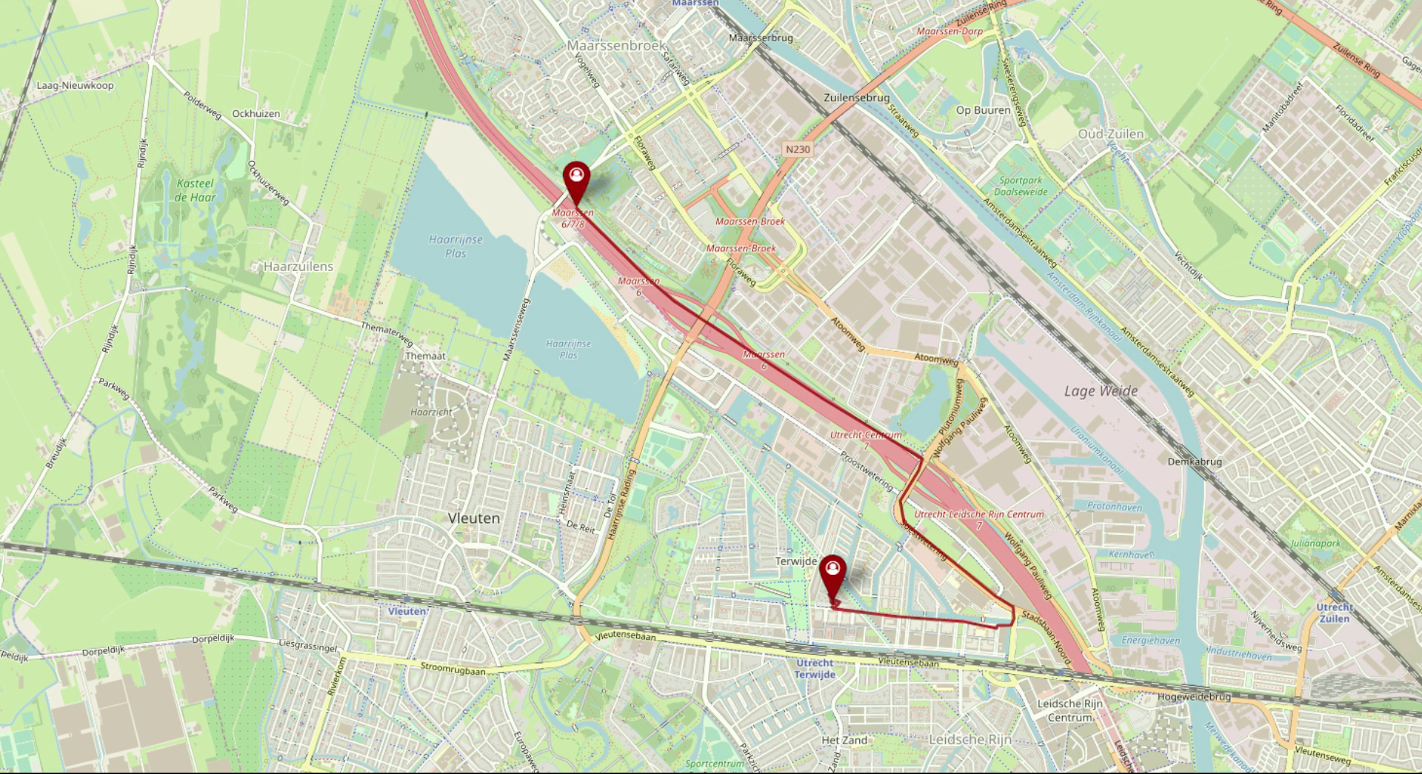
Node-red using a worldmap plugin displays the current position of my mobile. Coordinates are stored in a InfluxDB and geolocation is being used to activate/de-activate other node-red nodes.
Start with downloading :
https://github.com/owntracks/tools/blob/master/TLS/generate-CA.sh
Get some environment stuff into place
export IPLIST="83.161.x.x 192.168.1.1 10.12.1.1"
export HOSTLIST="internalhostname.my.lab henriaanstoot.nl mqtt.henriaanstoot.nl"
Generate Certificates and client certificates.
./generate-CA.sh # creates ca.crt and server.{key,crt}
./generate-CA.sh mqttserver # creates server certs
./generate-CA.sh client workstation # creates client certs
./generate-CA.sh client mobile # creates mobile cert
NOTE:
My workstation client is MQTT-explorer, no need to change anything
For owntracks on your mobile you need a P12 certicate, thats a combined cert+key certificate.
openssl pkcs12 -export -in mobile.crt -inkey mobile.key -out mobile.p12Check certs with
openssl x509 -noout -text -in server.crt | grep DNS:
Download p12 and ca.crt to you mobile.
MQTT-explorer, add a new connection and select workstation.crt ca.crt and workstation.key
Create a mqtt password file
mosquitto_passwd -c /etc/mosquitto/passwordfile firstuser
mosquitto_passwd -b /etc/mosquitto/passwordfile nextuser
TLS mosquitto example, change where needed. (this is a multi setup, portforward ONLY 8883 to this instance)
1883 is only for internal bridge communication.
# Place your local configuration in /etc/mosquitto/conf.d/
#
# A full description of the configuration file is at
# /usr/share/doc/mosquitto/examples/mosquitto.conf.example
pid_file /var/run/mosquitto.pid
persistence true
persistence_location /var/lib/mosquitto/
# Plain MQTT protocol
listener 1883
# End of plain MQTT configuration
# MQTT over TLS/SSL
listener 8883
cafile /etc/mosquitto/certs/ca.crt
certfile /etc/mosquitto/certs/server.crt
keyfile /etc/mosquitto/certs/server.key
allow_anonymous false
password_file /etc/mosquitto/passwords
# End of MQTT over TLS/SLL configuration
listener 9001
protocol websockets
# End of plain Websockets configuration
# WebSockets over TLS/SSL
listener 9883
protocol websockets
cafile /etc/mosquitto/certs/ca.crt
certfile /etc/mosquitto/certs/server.crt
keyfile /etc/mosquitto/certs/server.key
log_dest file /var/log/mosquitto/mosquitto.log
#include_dir /etc/mosquitto/conf.d
connection bridge-01
address INTERNALIP:1883
topic owntracks/# both 0
Plain internal ‘open’ mosquitto setup only needs bridge config
connection bridge-01
address TLSMOSQUITTOINSTANCE-IP:1883
topic # in 2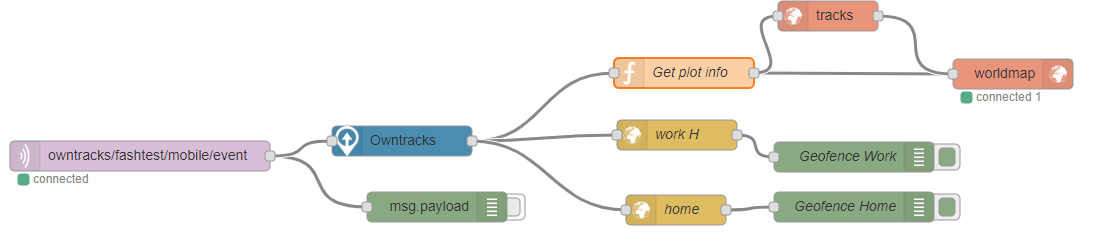
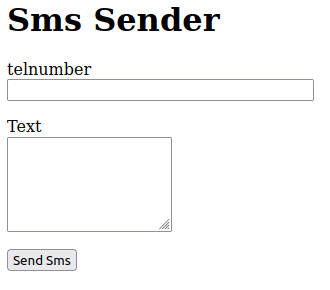
Made a generic sms sender, for check_mk monitoring + sending password of accounts.
You can send sms by filling in a form, or using a url like:
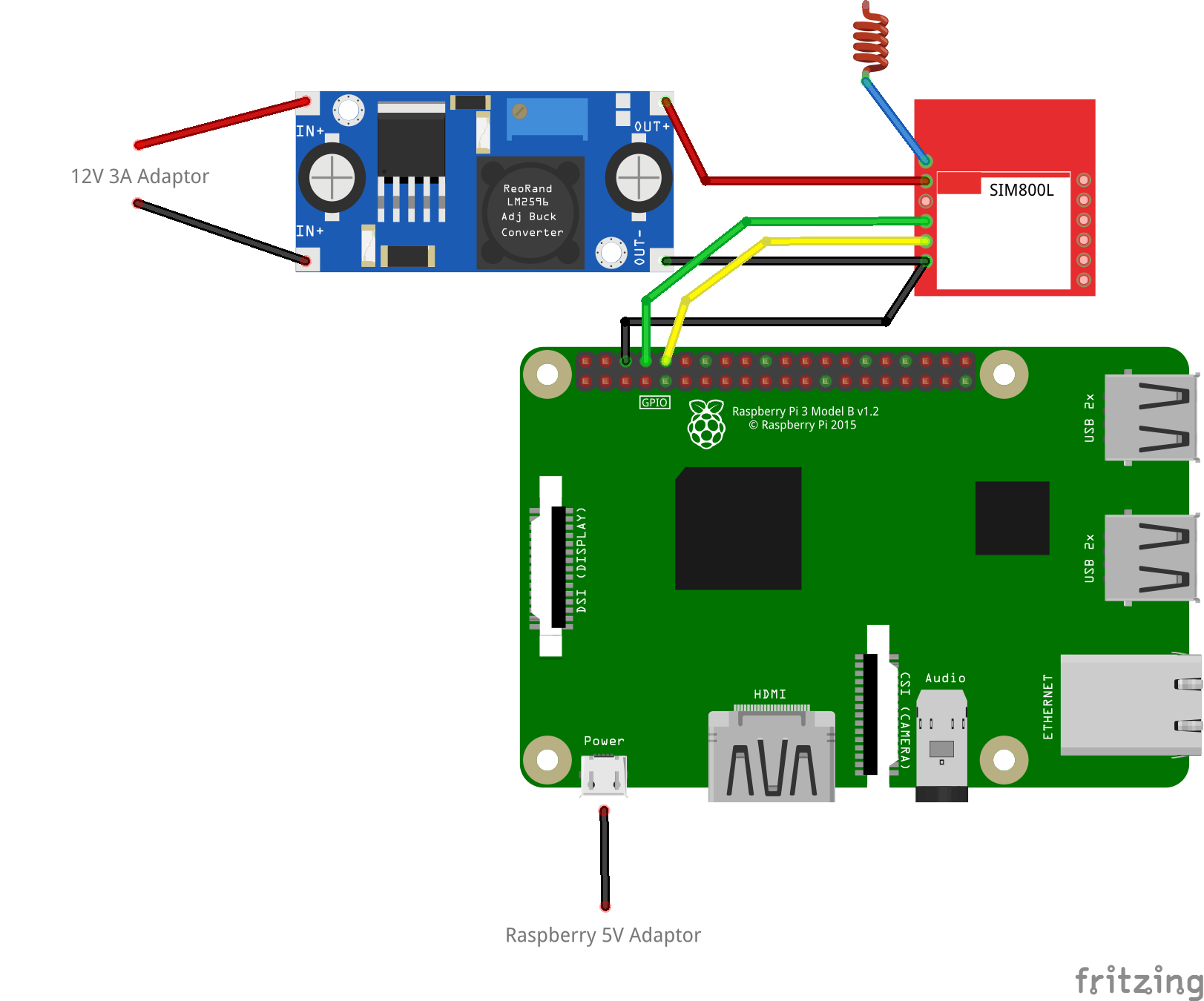
http://smsgateway.local:8080/sms/0612341234/Message%20met%20spatiesIt uses a Raspberry and a sim800L module.
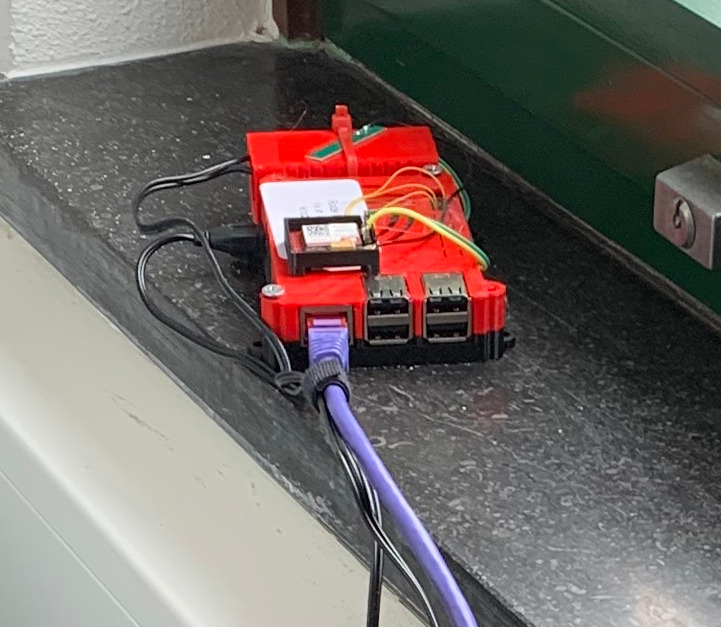
Remove pin from simcard fix:
sudo minicom -b 115000 -o -D /dev/serial0

 AT+CPIN?
+CPIN: SIM PIN

AT+CPIN=0000
OK

AT+CLCK=”SC”,0,”0000″
OK

AT+CPIN?
+CPIN: READY
Cron
@reboot sh /home/pi/launcher.sh Launcher
cat /home/pi/launcher.sh
#!/bin/bash
cd /home/pi
while true; do
/usr/bin/python newapi.py
done
newapi.py (uses flask)
import serial
import RPi.GPIO as GPIO
import os, time
import sys

from flask import Flask, render_template, request
app = Flask(__name__)

from flask_wtf import FlaskForm
from wtforms import StringField, PasswordField, BooleanField, SubmitField, TextAreaField
from wtforms.validators import DataRequired

from flask import render_template

app.config['SECRET_KEY'] = 'you-will-never-guess'

class FormForm(FlaskForm):
    telnumber = StringField('telnumber', validators=[DataRequired()])
    messagepart = TextAreaField('Text', render_kw={"rows": 5, "cols": 20})
    submit = SubmitField('Send Sms')

@app.route("/sms/<number>/<message>")
def action(number, message):
        num = number.encode()
        mes = message.encode()
	GPIO.setmode(GPIO.BOARD)
	# Enable Serial Communication
	port = serial.Serial("/dev/serial0", baudrate=9600, timeout=1)

	# Transmitting AT Commands to the Modem
	# '\r\n' indicates the Enter key
	port.write('AT'+'\r\n')
	rcv = port.read(10)
	print rcv
	time.sleep(1)
	#port.write('ATE0'+'\r\n')      # Disable the Echo
	#rcv = port.read(10)
	#print rcv
	#time.sleep(1)
	port.write('AT+CMGF=1'+'\r\n')  # Select Message format as Text mode
	rcv = port.read(10)
	print rcv
	time.sleep(1)
	port.write('AT+CNMI=2,1,0,0,0'+'\r\n')   # New SMS Message Indications
	rcv = port.read(10)
	print rcv
	time.sleep(1)
	port.write('AT+CSCS="GSM"'+'\r\n')
	rcv = port.read(10)
	print rcv
	time.sleep(1)
	# Sending a message to a particular Number
	port.write('AT+CMGS="'+num+'"\r\n')
	rcv = port.read(10)
	print rcv
	time.sleep(1)
	port.write(mes+'\r\n')  # Message
	rcv = port.read(10)
	print rcv
	port.write("\x1A") # Enable to send SMS
	for i in range(10):
	    rcv = port.read(10)
	    print rcv
        return 'OK'
@app.route("/form")
def form():
    form = FormForm()
    return render_template('web.html', title='Web Sms', form=form)
@app.route('/data', methods = ['POST', 'GET'])
def data():
    if request.method == 'GET':
        return "The URL /data is accessed directly. Try going to '/form' to submit form"
    if request.method == 'POST':

        telnumber = request.form['telnumber']
        messagepart = request.form['messagepart']
        num = telnumber.encode()
        mes = messagepart.encode()
	GPIO.setmode(GPIO.BOARD)
	# Enable Serial Communication
	port = serial.Serial("/dev/serial0", baudrate=9600, timeout=1)
	# Transmitting AT Commands to the Modem
	# '\r\n' indicates the Enter key
	port.write('AT'+'\r\n')
	rcv = port.read(10)
	print rcv
	time.sleep(1)
	#port.write('ATE0'+'\r\n')      # Disable the Echo
	#rcv = port.read(10)
	#print rcv
	#time.sleep(1)
	port.write('AT+CMGF=1'+'\r\n')  # Select Message format as Text mode
	rcv = port.read(10)
	print rcv
	time.sleep(1)
	port.write('AT+CNMI=2,1,0,0,0'+'\r\n')   # New SMS Message Indications
	rcv = port.read(10)
	print rcv
	time.sleep(1)
	port.write('AT+CSCS="GSM"'+'\r\n')
	rcv = port.read(10)
	print rcv
	time.sleep(1)
	# Sending a message to a particular Number
	port.write('AT+CMGS="'+num+'"\r\n')
	rcv = port.read(10)
	print rcv
	time.sleep(1)
	port.write(mes+'\r\n')  # Message
	rcv = port.read(10)
	print rcv
	port.write("\x1A") # Enable to send SMS
	for i in range(10):
	    rcv = port.read(10)
	    print rcv

        return '<a href="/form">Nog een SMS sturen</a>'
@app.route("/checkmk")
def checkmk():
        # Enable Serial Communication
        port = serial.Serial("/dev/serial0", baudrate=9600, timeout=1)

        port.write('AT'+'\r\n')
        rcv1 = port.read(30)
        time.sleep(1)

        port.write('AT+CPAS'+'\r\n')
        rcv2 = port.read(30)
        time.sleep(1)

        port.write('AT+CGREG?'+'\r\n')
        rcv3 = port.read(30)
        time.sleep(1)

        port.write('AT+CGATT?'+'\r\n')
        rcv4 = port.read(30)
        time.sleep(1)

        port.write('AT+CSQ'+'\r\n')
        rcv5 = port.read(30)
        time.sleep(1)

        return 'OK of niet' + rcv1 + rcv2 + rcv3 + rcv4 + rcv5
if __name__ == "__main__":
   app.run(host='0.0.0.0', port=8080, debug=True)
I did the donut in Blender!

A few days later i used blender tracking to move around a (incomplete render) of the donut.
I’ve learned a lot by following YT blender tutorials
Printable tracker marks ( https://www.herma.nl/kantoor-thuis/gratis-software/etiketten-assistent-online/etiketten-assistent-online/ )
Herma round labels
I used OpenCV to track my face, and draw something that moves with me when i move.
Just a prove of concept. I will post used code when i find it back.
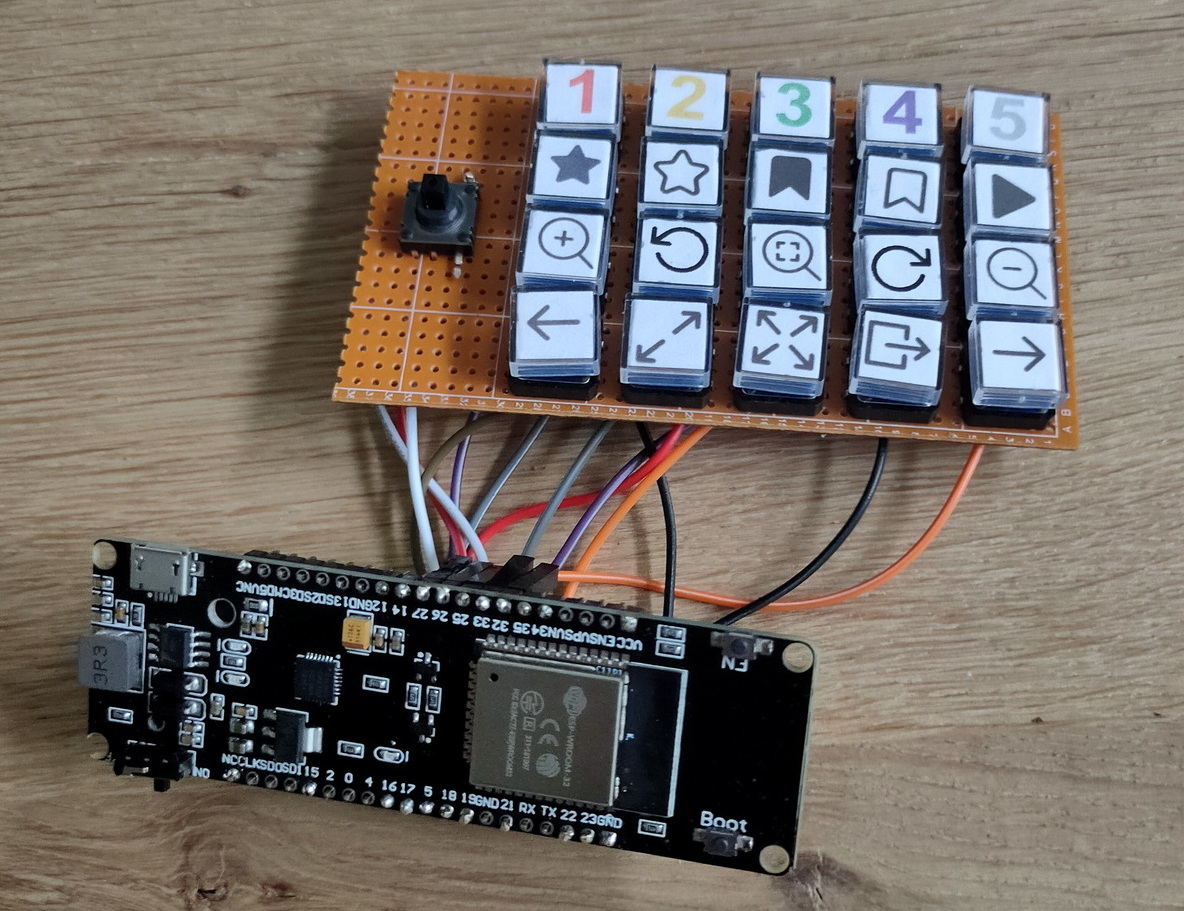
I’ve used a esp32 with 18650 battery holder.
I still have to 3d print a case 🙂
Code:
#include <BleConnectionStatus.h>
#include <BleKeyboard.h>
#include <KeyboardOutputCallbacks.h>

#define DEBUG 0micro joystick
#define STAR 16
#define FLAG 17
#define COL1 18
#define COL2 19
#define COL3 21
#define COL4 22
#define COL5 23
#define COL6 25
#define ROW1 26
#define ROW2 27
#define ROW3 32
#define ROW4 33

int flagstate = 0;
int starstate = 0;
int row1state = 0;
int row2state = 0;
int row3state = 0;
int row4state = 0;
int col1state = 0;
int col2state = 0;
int col3state = 0;
int col4state = 0;
int col5state = 0;
int col6state = 0;

int colstate = 1;

BleKeyboard bleKeyboard;

void setup() {
#ifdef DEBUG
  Serial.begin(9600);
#endif
  bleKeyboard.begin();
  pinMode(STAR, INPUT_PULLUP);
  pinMode(FLAG, INPUT_PULLUP);
  pinMode(ROW1, INPUT_PULLUP);
  pinMode(ROW2, INPUT_PULLUP);
  pinMode(ROW3, INPUT_PULLUP);
  pinMode(ROW4, INPUT_PULLUP);
  pinMode(COL1, OUTPUT);
  pinMode(COL2, OUTPUT);
  pinMode(COL3, OUTPUT);
  pinMode(COL4, OUTPUT);
  pinMode(COL5, OUTPUT);
  pinMode(COL6, OUTPUT);
}
void loop() {
#ifdef DEBUG
  Serial.print("Colstate : ");
  Serial.print(colstate);
  Serial.print('\n');
#endif

  if (colstate == 1) {
    digitalWrite(COL1, LOW);
    digitalWrite(COL2, HIGH);
    digitalWrite(COL3, HIGH);
    digitalWrite(COL4, HIGH);
    digitalWrite(COL5, HIGH);
    digitalWrite(COL6, HIGH);
  }
  if (colstate == 2) {
    digitalWrite(COL1, HIGH);
    digitalWrite(COL2, LOW);
    digitalWrite(COL3, HIGH);
    digitalWrite(COL4, HIGH);
    digitalWrite(COL5, HIGH);
    digitalWrite(COL6, HIGH);
  }
  if (colstate == 3) {
    digitalWrite(COL1, HIGH);
    digitalWrite(COL2, HIGH);
    digitalWrite(COL3, LOW);
    digitalWrite(COL4, HIGH);
    digitalWrite(COL5, HIGH);
    digitalWrite(COL6, HIGH);
  }
  if (colstate == 4) {
    digitalWrite(COL1, HIGH);
    digitalWrite(COL2, HIGH);
    digitalWrite(COL3, HIGH);
    digitalWrite(COL4, LOW);
    digitalWrite(COL5, HIGH);
    digitalWrite(COL6, HIGH);
  }
  if (colstate == 5) {
    digitalWrite(COL1, HIGH);
    digitalWrite(COL2, HIGH);
    digitalWrite(COL3, HIGH);
    digitalWrite(COL4, HIGH);
    digitalWrite(COL5, LOW);
    digitalWrite(COL6, HIGH);
  }
  if (colstate == 6) {
    digitalWrite(COL1, HIGH);
    digitalWrite(COL2, HIGH);
    digitalWrite(COL3, HIGH);
    digitalWrite(COL4, HIGH);
    digitalWrite(COL5, HIGH);
    digitalWrite(COL6, LOW);
  }
  delay (100);
  flagstate = digitalRead(FLAG);
  starstate = digitalRead(STAR);
  row1state = digitalRead(ROW1);
  row2state = digitalRead(ROW2);
  row3state = digitalRead(ROW3);
  row4state = digitalRead(ROW4);
#ifdef DEBUG
  Serial.print("Rowstates : ");
  Serial.print(row1state);
  Serial.print(row2state);
  Serial.print(row3state);
  Serial.print(row4state);
  Serial.print('\n');
#endif
  // ROW1 = UP,DOWN,LEFT,RIGHT
  if (bleKeyboard.isConnected() && colstate == 1) {
    // UP
#ifdef DEBUG
    Serial.print("Up Pressed ");
    Serial.print('\n');
#endif

    if (row1state == 0) {
      bleKeyboard.press(KEY_UP_ARROW);
      delay (100);
      bleKeyboard.releaseAll();
    }
    // DOWN
    if (row2state == 0) {
      bleKeyboard.press(KEY_DOWN_ARROW);
      delay (100);
      bleKeyboard.releaseAll();
    }
    // LEFT
    if (row3state == 0) {
      bleKeyboard.press(KEY_LEFT_ARROW);
      delay (100);
      bleKeyboard.releaseAll();
    }
    // RIGHT
    if (row4state == 0) {
      bleKeyboard.press(KEY_RIGHT_ARROW);
      delay (100);
      bleKeyboard.releaseAll();
    }
  }
  // ROW2 = (1),(star),ZOOMIN,PREVIOUS
  if (bleKeyboard.isConnected() && colstate == 2) {
    // 1 - star
    if (row1state == 0 && starstate == 0) {
      bleKeyboard.press(KEY_LEFT_CTRL);
      bleKeyboard.press('1');
      delay (100);
      bleKeyboard.releaseAll();
    }
    // 1 - flag
    if (row1state == 0 && flagstate == 0) {
      bleKeyboard.press(KEY_LEFT_ALT);
      bleKeyboard.press('1');
      delay (100);
      bleKeyboard.releaseAll();
    }
    // NO ROWSTATE2

    // zoom in
    if (row3state == 0) {
      bleKeyboard.press('+');
      delay (100);
      bleKeyboard.releaseAll();
    }
    // PREVIOUS
    if (row4state == 0) {
      bleKeyboard.press(KEY_LEFT_CTRL);
      bleKeyboard.press(KEY_LEFT_ARROW);
      delay (100);
      bleKeyboard.releaseAll();
    }
  }
  // ROW3 = (2),unstar,CCWrotate,open
  if (bleKeyboard.isConnected() && colstate == 3) {
    // 2 - star
    if (row1state == 0 && starstate == 0) {
      bleKeyboard.press(KEY_LEFT_CTRL);
      bleKeyboard.press('2');
      delay (100);
      bleKeyboard.releaseAll();
    }
    // 2 - flag
    if (row1state == 0 && flagstate == 0) {
      bleKeyboard.press(KEY_LEFT_ALT);
      bleKeyboard.press('2');
      delay (100);
      bleKeyboard.releaseAll();
    }
    // unstar
    if (row2state == 0) {
      bleKeyboard.press(KEY_LEFT_CTRL);
      bleKeyboard.press('0');
      delay (100);
      bleKeyboard.releaseAll();
    }
    // CCW rotate
    if (row3state == 0) {
      bleKeyboard.press(KEY_LEFT_CTRL);
      bleKeyboard.press(KEY_LEFT_ALT);
      bleKeyboard.press(KEY_LEFT_ARROW);
      delay (100);
      bleKeyboard.releaseAll();
    }
    // open
    if (row4state == 0) {
      bleKeyboard.press(KEY_RETURN);
      delay (100);
      bleKeyboard.releaseAll();
    }
  }

  // ROW4 = (3),(flag),zoom,fullscreen
  if (bleKeyboard.isConnected() && colstate == 4) {
    // 3 - star
    if (row1state == 0 && starstate == 0) {
      bleKeyboard.press(KEY_LEFT_CTRL);
      bleKeyboard.press('3');
      delay (100);
      bleKeyboard.releaseAll();
    }
    // 3 - flag
    if (row1state == 0 && flagstate == 0) {
      bleKeyboard.press(KEY_LEFT_ALT);
      bleKeyboard.press('3');
      delay (100);
      bleKeyboard.releaseAll();
    }
    // NO ROWSTATE2

    // zoom reset
    if (row3state == 0) {
      bleKeyboard.press('*');
      delay (100);
      bleKeyboard.releaseAll();
    }
    // fullscreen
    if (row4state == 0) {
      bleKeyboard.press('f');
      delay (100);
      bleKeyboard.releaseAll();
    }
  }

  // ROW5 = (4),unflag,CWrotate,exit
  if (bleKeyboard.isConnected() && colstate == 5) {
    // 4 - star
    if (row1state == 0 && starstate == 0) {
      bleKeyboard.press(KEY_LEFT_CTRL);
      bleKeyboard.press('4');
      delay (100);
      bleKeyboard.releaseAll();
    }
    // 4 - flag
    if (row1state == 0 && flagstate == 0) {
      bleKeyboard.press(KEY_LEFT_ALT);
      bleKeyboard.press('4');
      delay (100);
      bleKeyboard.releaseAll();
    }
    // unflag
    if (row2state == 0) {
      bleKeyboard.press(KEY_LEFT_ALT);
      bleKeyboard.press('0');
      delay (100);
      bleKeyboard.releaseAll();
    }
    // CW rotate
    if (row3state == 0) {
      bleKeyboard.press(KEY_LEFT_CTRL);
      bleKeyboard.press(KEY_LEFT_ALT);
      bleKeyboard.press(KEY_RIGHT_ARROW);
      delay (100);
      bleKeyboard.releaseAll();
    }
    // exit
    if (row4state == 0) {
      bleKeyboard.press(KEY_ESC);
      delay (100);
      bleKeyboard.releaseAll();
    }
  }

  // ROW6 = (5),slideshow,zoomout,next
  if (bleKeyboard.isConnected() && colstate == 6) {
    // 5 - star
    if (row1state == 0 && starstate == 0) {
      bleKeyboard.press(KEY_LEFT_CTRL);
      bleKeyboard.press('5');
      delay (100);
      bleKeyboard.releaseAll();
    }
    // 5 - flag
    if (row1state == 0 && flagstate == 0) {
      bleKeyboard.press(KEY_LEFT_ALT);
      bleKeyboard.press('5');
      delay (100);
      bleKeyboard.releaseAll();
    }
    // slideshow
    if (row2state == 0) {
      bleKeyboard.press(KEY_ESC);
      bleKeyboard.press(KEY_LEFT_CTRL);
      bleKeyboard.press('s');
      delay (100);
      bleKeyboard.releaseAll();
    }
    // zoom out
    if (row3state == 0) {
      bleKeyboard.press('-');
      delay (100);
      bleKeyboard.releaseAll();
    }
    // next
    if (row4state == 0) {
      bleKeyboard.press(KEY_LEFT_CTRL);
      bleKeyboard.press(KEY_RIGHT_ARROW);
      delay (100);
      bleKeyboard.releaseAll();
    }
  }
  colstate++;
  if (colstate == 7) {
    colstate = 1;
  }
}
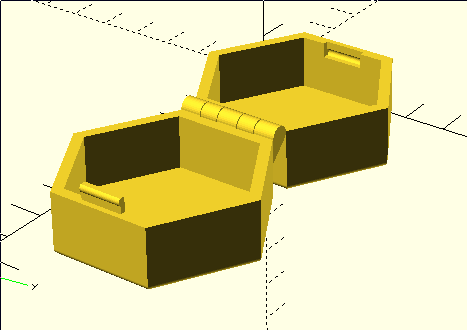
Control a dimmer using a hex wireless box.
Parts
Put the box flat on the table to switch off.
When you put it on one side, it will controll your lights brightness.
20,40,60,80 and 100%, just by rotating and putting it down on its sides.
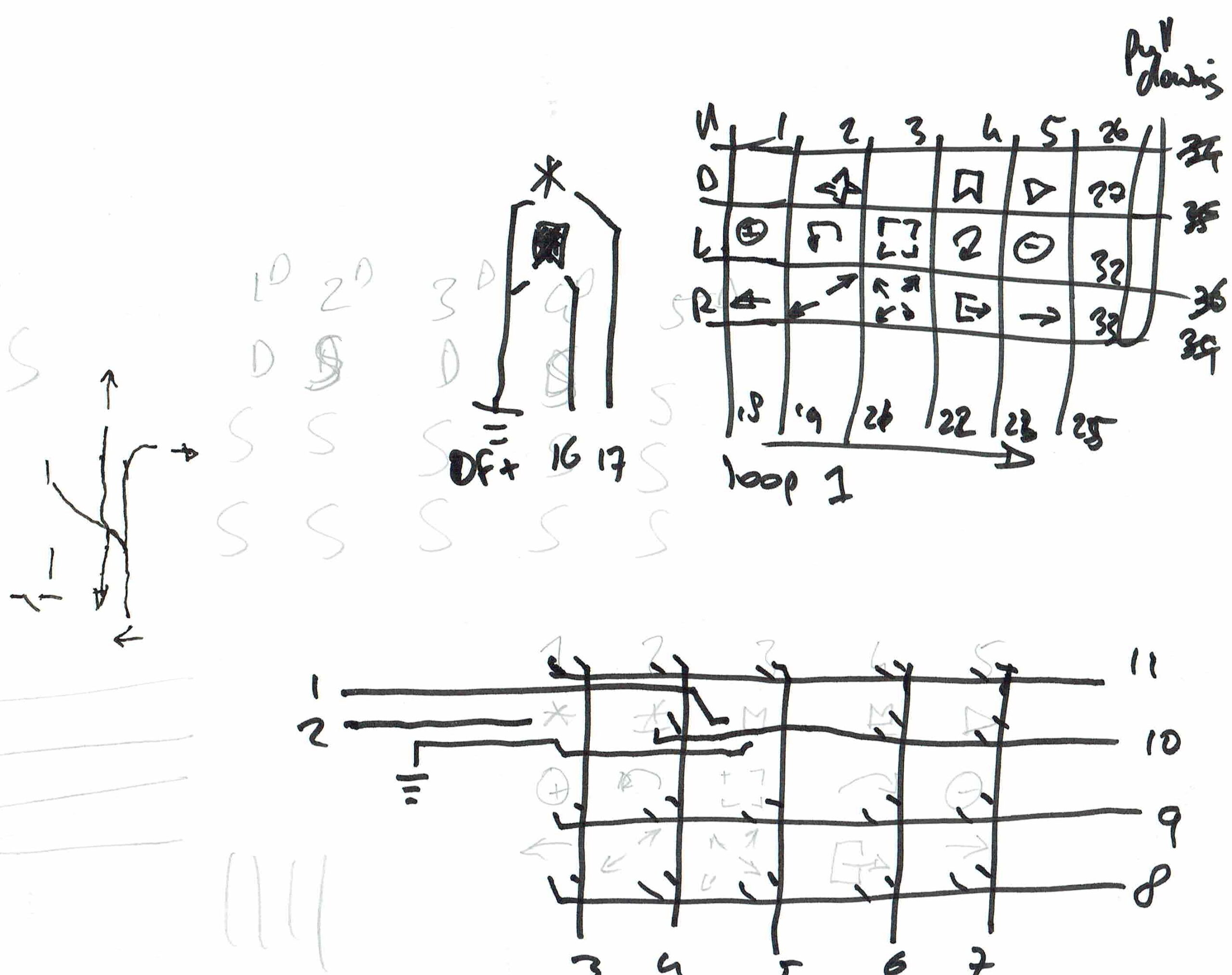
Schematics (without the wireless charging part)
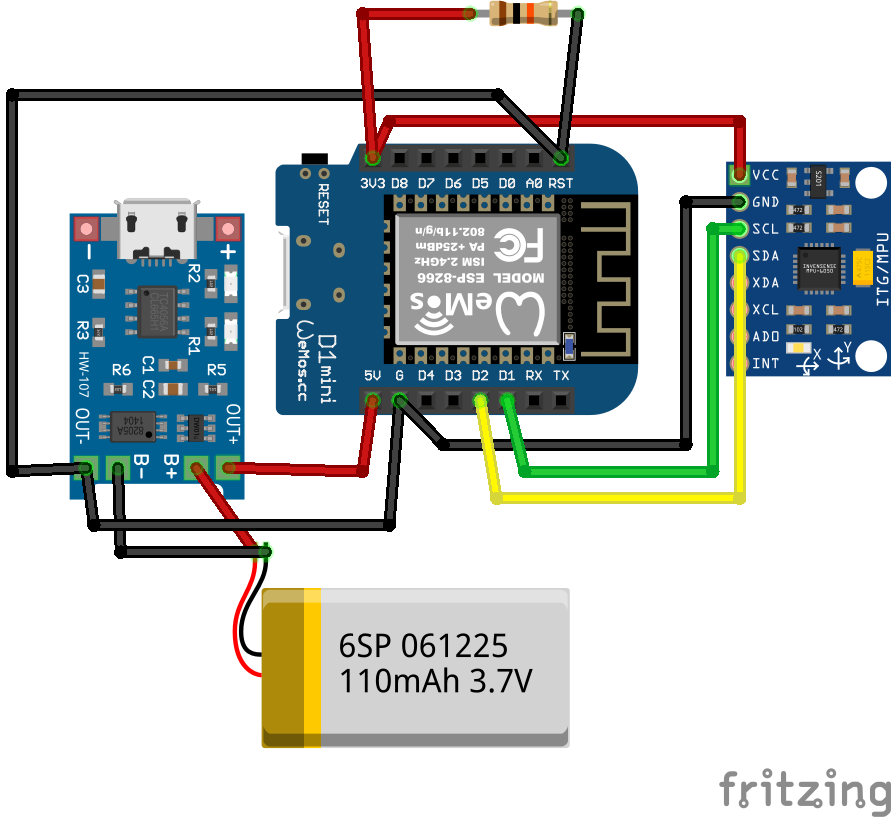
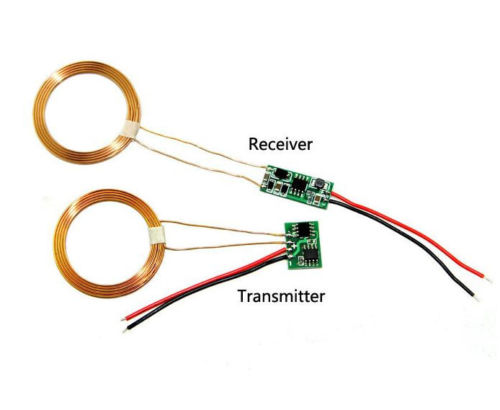
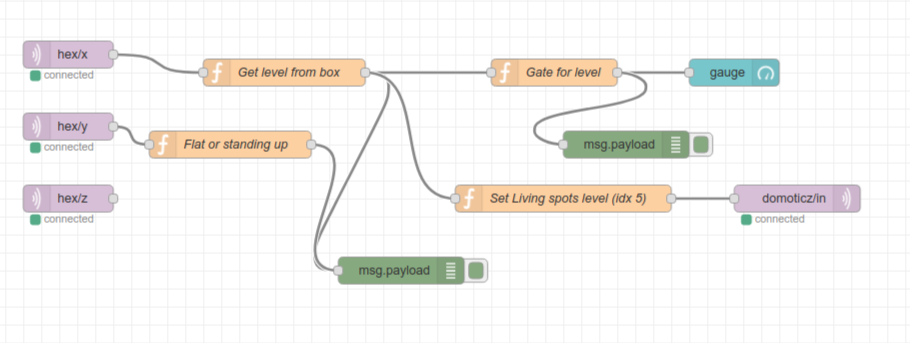
Node-Red Controll part (source below)
Nice to have’s :
Arduino-sleep mode, wakeup with a movement sensor.
Arduino Code
#include <Wire.h>
//#include <SPI.h>
#include <PubSubClient.h>
//#include <string.h>
//#include <stdio.h>
#include <ESP8266WiFi.h>

// Wifi settings
const char* ssid = "xxxxxx";
const char* password = "xxxxxxxxxx";
const char* mqtt_server = "10.1.0.17";

// I2C address of the MPU-6050 - 0x68 or 0x69 if AD0 is pulled HIGH
const int MPU = 0x68;
int16_t AcX, AcY, AcZ, GyX, GyY, GyZ;
float gForceX, gForceY, gForceZ, rotX, rotY, rotZ;

// Wifi MAC address
byte mac[]= {  0xDE, 0xED, 0xBA, 0xFE, 0xFE, 0xED };

WiFiClient espClient;
IPAddress ip;
PubSubClient mqttClient(espClient);

// IP address of your MQTT server
const char* server = "10.1.0.17";
//const char* outTopic = "test/";
//const char* server = "iot.eclipse.org";

void dataReceiver(){
  Wire.beginTransmission(MPU);
  Wire.write(0x3B);  // starting with register 0x3B (ACCEL_XOUT_H)
  Wire.endTransmission(false);
  Wire.requestFrom(MPU,14,true);  // request a total of 14 registers
  AcX = Wire.read()<<8|Wire.read();  // 0x3B (ACCEL_XOUT_H) & 0x3C (ACCEL_XOUT_L)
  AcY = Wire.read()<<8|Wire.read();  // 0x3D (ACCEL_YOUT_H) & 0x3E (ACCEL_YOUT_L)
  AcZ = Wire.read()<<8|Wire.read();  // 0x3F (ACCEL_ZOUT_H) & 0x40 (ACCEL_ZOUT_L)
  GyX = Wire.read()<<8|Wire.read();  // 0x43 (GYRO_XOUT_H) & 0x44 (GYRO_XOUT_L)
  GyY = Wire.read()<<8|Wire.read();  // 0x45 (GYRO_YOUT_H) & 0x46 (GYRO_YOUT_L)
  GyZ = Wire.read()<<8|Wire.read();  // 0x47 (GYRO_ZOUT_H) & 0x48 (GYRO_ZOUT_L)
  processData();
}

void processData(){
  gForceX = AcX / 16384.0;
  gForceY = AcY / 16384.0;
  gForceZ = AcZ / 16384.0;

  rotX = GyX / 131.0;
  rotY = GyY / 131.0;
  rotZ = GyZ / 131.0;
}

void debugFunction(int16_t AcX, int16_t AcY, int16_t AcZ, int16_t GyX, int16_t GyY, int16_t GyZ){
  // Print the MPU values to the serial monitor
  Serial.print("Accelerometer: ");
  Serial.print("X="); Serial.print(gForceX);
  Serial.print("|Y="); Serial.print(gForceY);
  Serial.print("|Z="); Serial.println(gForceZ);
  Serial.print("Gyroscope:");
  Serial.print("X="); Serial.print(rotX);
  Serial.print("|Y="); Serial.print(rotY);
  Serial.print("|Z="); Serial.println(rotZ);
}

void reconnect() {
  // Loop until we're reconnected
  while (!mqttClient.connected()) {
    Serial.print("Attempting MQTT connection...");
    // Attempt to connect
    if (mqttClient.connect("arduinoClient")){
      Serial.println("connected");
    }
    else {
      Serial.print("failed, rc=");
      Serial.print(mqttClient.state());
      Serial.println(" try again in 5 seconds");
//      Wait 5 seconds before retrying
      delay(1000);
    }
  }
}

void setup(){
  Serial.begin(9600);

    setup_wifi();

  Wire.begin(0,2);
  Wire.beginTransmission(MPU);
  Wire.write(0x6B);  // PWR_MGMT_1 register
  Wire.write(0);     // set to zero (wakes up the MPU-6050)
  Wire.endTransmission(true);

  mqttClient.setServer(server, 1883);

//  Ethernet.begin(mac);
//  ip = Ethernet.localIP();

  Serial.println(ip);
  Serial.println(server);
  //delay(1500);
}

char* init(float val){

  char buff[100];

  for (int i = 0; i < 100; i++) {
      dtostrf(val, 4, 2, buff);  //4 is mininum width, 6 is precision
  }
   return buff;

}

void setup_wifi() {

  delay(10);
  // We start by connecting to a WiFi network
  Serial.println();
  Serial.print("Connecting to ");
  Serial.println(ssid);

  WiFi.begin(ssid, password);

  while (WiFi.status() != WL_CONNECTED) {
    delay(500);
    Serial.print(".");
  }

  Serial.println("");
  Serial.println("WiFi connected");
  Serial.println("IP address: ");
  Serial.println(WiFi.localIP());
}

void dataAcc(){

  char mpu6050X[100]= "";
  strcat(mpu6050X,init(gForceX));

  char mpu6050Y[100]= "";
  strcat(mpu6050Y,init(gForceY));

  char mpu6050Z[100]= "";
  strcat(mpu6050Z,init(gForceZ));

  // accelerometer - "topic, mpu6050"
  mqttClient.publish("AcX/", mpu6050X);
  mqttClient.publish("AcY/", mpu6050Y);
  mqttClient.publish("AcZ/", mpu6050Z);
//  mqttClient.publish(outTopic, "text to send via mqtt");
}


void dataGy(){

  char mpu6050X[100]= "";
  strcat(mpu6050X,init(rotX));

  char mpu6050Y[100]= "";
  strcat(mpu6050Y,init(rotY));

  char mpu6050Z[100]= "";
  strcat(mpu6050Z,init(rotZ));

  // gyroscope - "topic, mpu6050"
  mqttClient.publish("GyX/", mpu6050X);
  mqttClient.publish("GyY/", mpu6050Y);
  mqttClient.publish("GyZ/", mpu6050Z);
//  mqttClient.publish(outTopic, "text to send via mqtt");
}

void loop(){
  dataReceiver();
  debugFunction(AcX,AcY,AcZ,GyX,GyY,GyZ);

  if (!mqttClient.connected()) {
    reconnect();
  }

  mqttClient.loop();

  dataAcc();
  dataGy();

  delay(2000);
}
Nodered Flow
[
    {
        "id": "7550958a.b29dec",
        "type": "mqtt in",
        "z": "a0126a6a.9c70b8",
        "name": "",
        "topic": "hex/x",
        "qos": "2",
        "broker": "8c74c5f6.9a7a48",
        "x": 270,
        "y": 100,
        "wires": [
            [
                "d251dd79.5700d"
            ]
        ]
    },
    {
        "id": "e84b0a1.18096f8",
        "type": "mqtt in",
        "z": "a0126a6a.9c70b8",
        "name": "",
        "topic": "hex/y",
        "qos": "2",
        "broker": "8c74c5f6.9a7a48",
        "x": 270,
        "y": 180,
        "wires": [
            [
                "9c27bc8f.b62dd"
            ]
        ]
    },
    {
        "id": "6a1a0d8d.b3e754",
        "type": "mqtt in",
        "z": "a0126a6a.9c70b8",
        "name": "",
        "topic": "hex/z",
        "qos": "2",
        "broker": "8c74c5f6.9a7a48",
        "x": 270,
        "y": 260,
        "wires": [
            []
        ]
    },
    {
        "id": "2d2a911a.6af3fe",
        "type": "ui_gauge",
        "z": "a0126a6a.9c70b8",
        "name": "",
        "group": "d43a9f25.6c874",
        "order": 23,
        "width": 0,
        "height": 0,
        "gtype": "gage",
        "title": "gauge",
        "label": "units",
        "format": "{{value}}",
        "min": "0",
        "max": "100",
        "colors": [
            "#00b500",
            "#e6e600",
            "#ca3838"
        ],
        "seg1": "",
        "seg2": "",
        "x": 1010,
        "y": 120,
        "wires": []
    },
    {
        "id": "d251dd79.5700d",
        "type": "function",
        "z": "a0126a6a.9c70b8",
        "name": "Get level from box",
        "func": "var my=msg.payload;\nmsg.payload = {};\nif (my == 0.85){\n    msg.payload=20;\n    return msg;\n}\nelse if (my == 0.86){\n    msg.payload=20;\n    return msg;\n}\nelse if (my == 0.87){\n    msg.payload=20;\n    return msg;\n}\n\nelse if (my == 0.03){\n    msg.payload=40;\n    return msg;\n}\nelse if (my == 0.02){\n    msg.payload=40;\n    return msg;\n}\n\nelse if (my == 3.17){\n    msg.payload=60;\n    return msg;\n}\nelse if (my == 3.18){\n    msg.payload=60;\n    return msg;\n}\n\nelse if (my == 0.04){\n    msg.payload=80;\n    return msg;\n}\nelse if (my == 0.05){\n    msg.payload=80;\n    return msg;\n}\n\nelse if (my == 3.95){\n    msg.payload=100;\n    return msg;\n}\nelse if (my == 3.96){\n    msg.payload=100;\n    return msg;\n}\nelse {\n    return msg;\n    \n}\n",
        "outputs": 1,
        "noerr": 0,
        "x": 510,
        "y": 120,
        "wires": [
            [
                "ecd746cc.fce348",
                "8721e902.45d8b8",
                "39c8f1ac.86affe"
            ]
        ]
    },
    {
        "id": "39c8f1ac.86affe",
        "type": "function",
        "z": "a0126a6a.9c70b8",
        "name": "Set Living spots level (idx 5)",
        "func": "var level = Number(msg.payload);\nmsg.payload = {};\nmsg.payload.idx = 5;\nmsg.payload.switchcmd = (\"Set Level\");\nmsg.payload.command = \"switchlight\";\nmsg.payload.level = level;\nreturn msg;  ",
        "outputs": 1,
        "noerr": 0,
        "x": 820,
        "y": 260,
        "wires": [
            [
                "bc0d6507.1d7748"
            ]
        ]
    },
    {
        "id": "bc0d6507.1d7748",
        "type": "mqtt out",
        "z": "a0126a6a.9c70b8",
        "name": "",
        "topic": "domoticz/in",
        "qos": "",
        "retain": "",
        "broker": "8c74c5f6.9a7a48",
        "x": 1080,
        "y": 260,
        "wires": []
    },
    {
        "id": "9c27bc8f.b62dd",
        "type": "function",
        "z": "a0126a6a.9c70b8",
        "name": "Flat or standing up",
        "func": "var mya=msg.payload;\nmsg.payload = {};\nif (mya < -3.80){\n    flow.set(\"levely\",1);\n    msg.payload  = \"plat\";\n        }\nelse {\n    flow.set(\"levely\",2);\n    msg.payload  = \"rechtop\";\n}\nreturn msg;",
        "outputs": 1,
        "noerr": 0,
        "x": 450,
        "y": 200,
        "wires": [
            [
                "ecd746cc.fce348"
            ]
        ]
    },
    {
        "id": "ecd746cc.fce348",
        "type": "debug",
        "z": "a0126a6a.9c70b8",
        "name": "",
        "active": true,
        "tosidebar": true,
        "console": false,
        "tostatus": false,
        "complete": "false",
        "x": 640,
        "y": 340,
        "wires": []
    },
    {
        "id": "8721e902.45d8b8",
        "type": "function",
        "z": "a0126a6a.9c70b8",
        "name": "Gate for level ",
        "func": "\nvar x = msg.payload;\ny = flow.get(msg.payload);\nvar y = flow.get('levely') || 0;\n\nif (y == 1){\n    msg.payload = {};\n        msg.payload = 0;\n} else {\n    msg.payload = x;\n}\n\nreturn msg;",
        "outputs": 1,
        "noerr": 0,
        "x": 810,
        "y": 120,
        "wires": [
            [
                "2d2a911a.6af3fe",
                "da72437e.88376"
            ]
        ]
    },
    {
        "id": "da72437e.88376",
        "type": "debug",
        "z": "a0126a6a.9c70b8",
        "name": "",
        "active": true,
        "tosidebar": true,
        "console": false,
        "tostatus": false,
        "complete": "false",
        "x": 890,
        "y": 200,
        "wires": []
    },
    {
        "id": "8c74c5f6.9a7a48",
        "type": "mqtt-broker",
        "z": "",
        "name": "10.1.0.17",
        "broker": "10.1.0.17",
        "port": "1883",
        "clientid": "",
        "usetls": false,
        "compatmode": true,
        "keepalive": "15",
        "cleansession": true,
        "birthTopic": "",
        "birthQos": "0",
        "birthPayload": "",
        "closeTopic": "",
        "closePayload": "",
        "willTopic": "",
        "willQos": "0",
        "willPayload": ""
    },
    {
        "id": "d43a9f25.6c874",
        "type": "ui_group",
        "z": "",
        "name": "Control",
        "tab": "739541e2.18396",
        "order": 1,
        "disp": true,
        "width": "6",
        "collapse": false
    },
    {
        "id": "739541e2.18396",
        "type": "ui_tab",
        "z": "",
        "name": "7inch",
        "icon": "dashboard",
        "order": 1,
        "disabled": false,
        "hidden": false
    }
]UPDATE 20231020 – Via USB Serial (also schematic for below integration)
https://www.henriaanstoot.nl/2023/10/20/thunderbird-mail-notification-flag-via-usb/
Using a servo which is MQTT controlled, and a slash command in Mattermost, i can be notified by friends and colleages.
Flag, and monitor-stand are 3D printed.
ESP is a simple wemos mini.
Coline sometimes plays games with her sisters online using my streaming server. (Due to Covid)
Some games are difficult because you have to point to a location on the table. So i came up with a laser pointer solution.
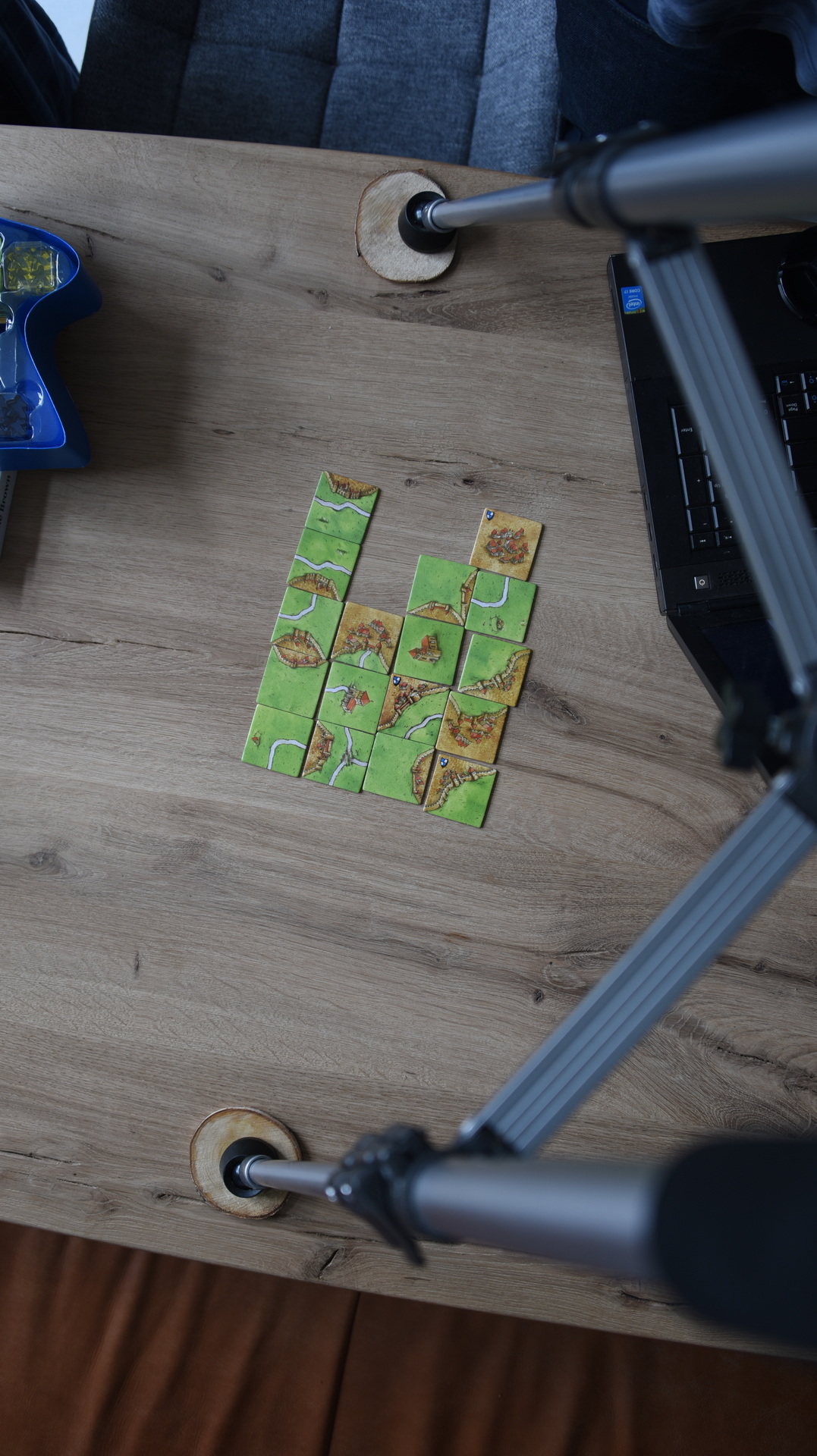
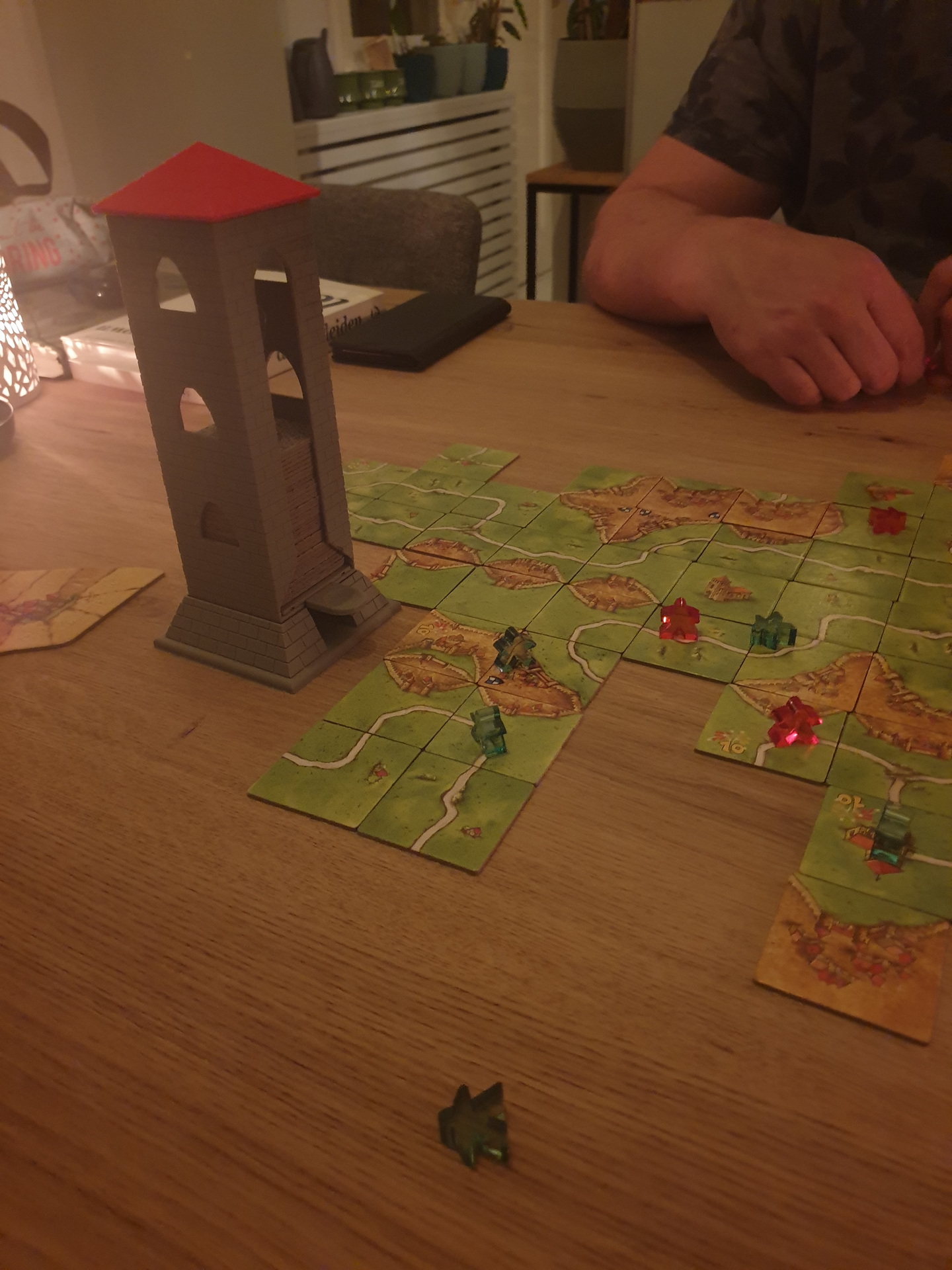
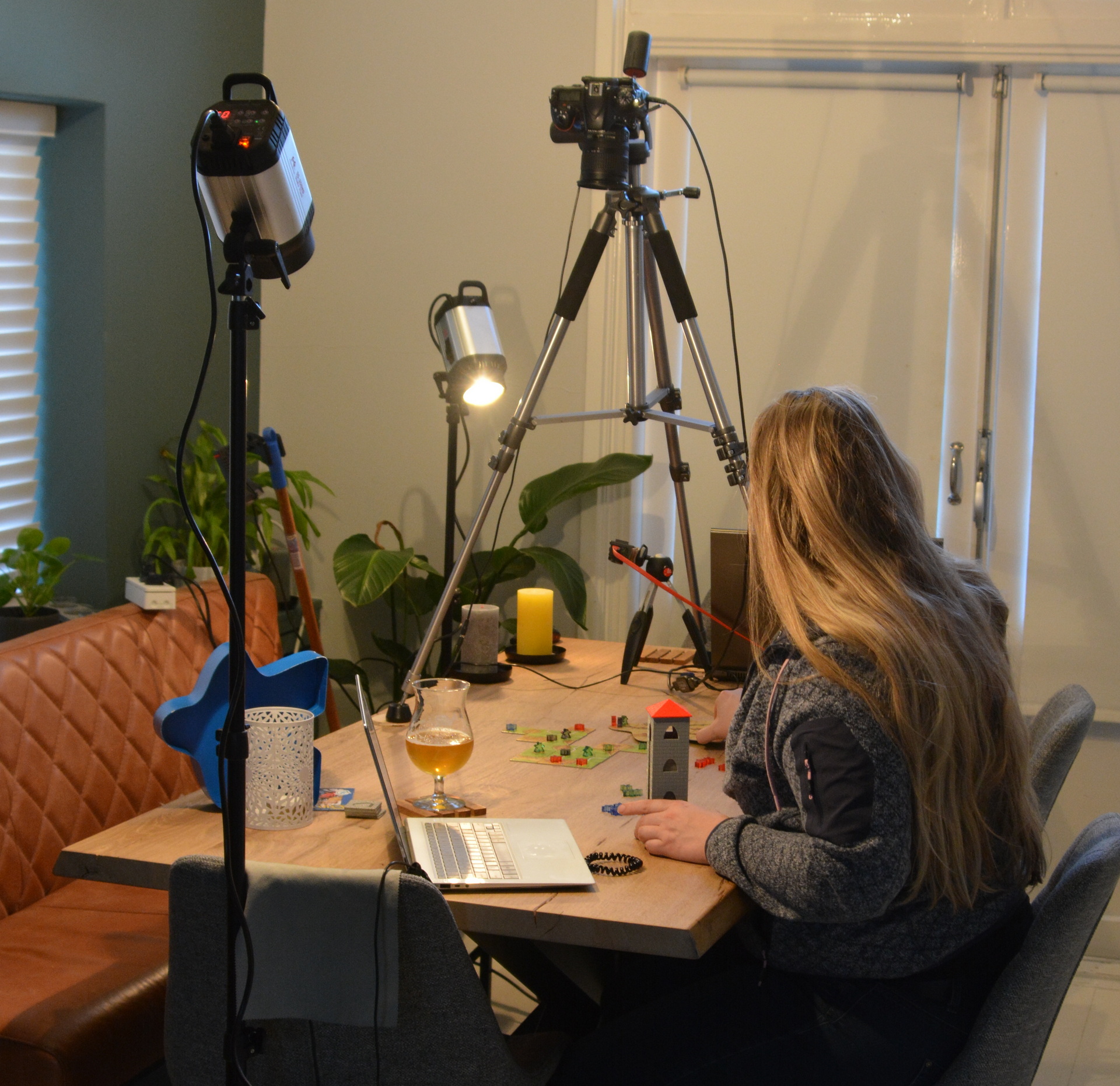
The idea is: Send a url to the players with a streaming camera, you see the game on your screen but you can click on a location on the screen to move a laser pointer to that location.
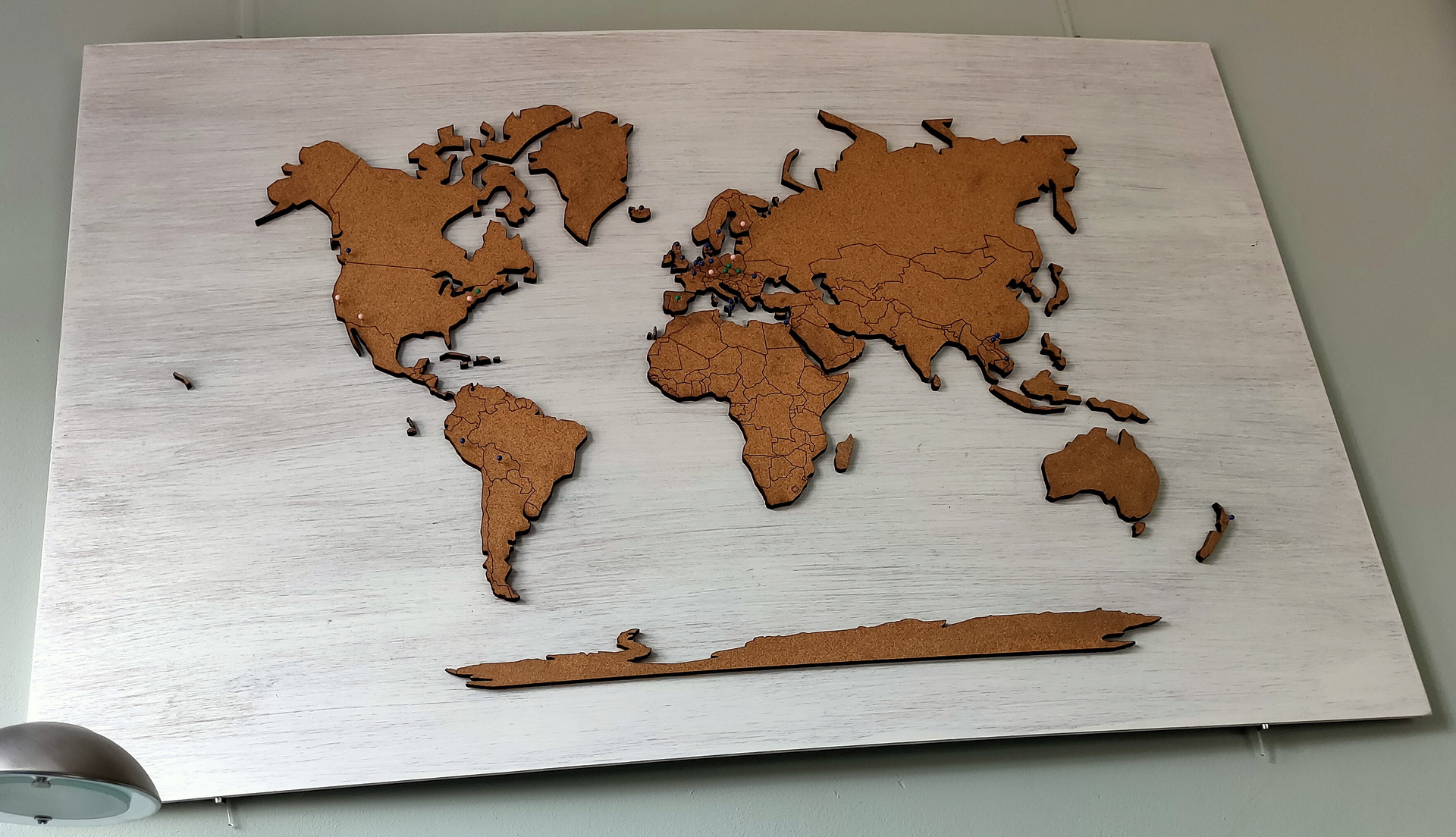
Below is a proof of concept using the Lasercut worldmap on the wall and a website with a worldmap.
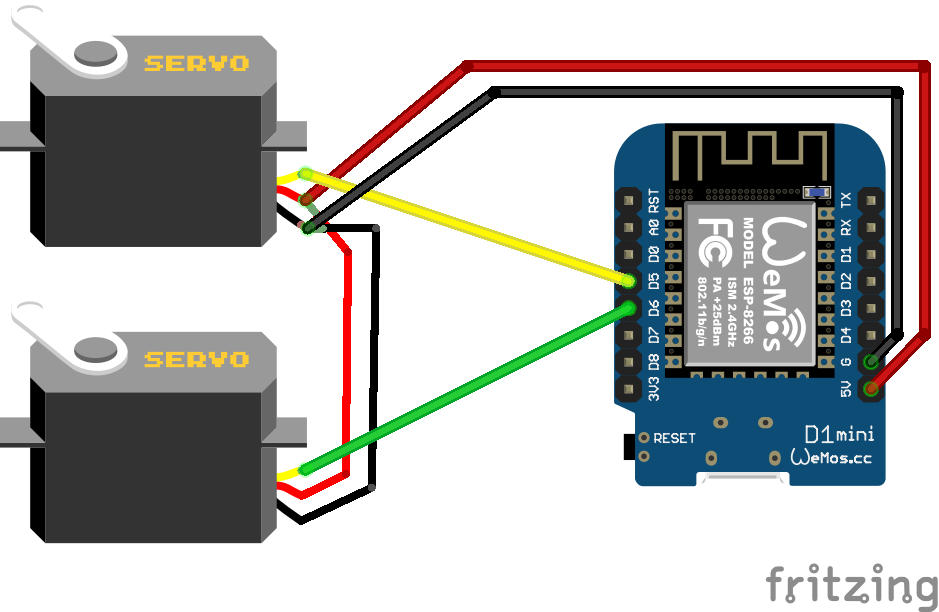
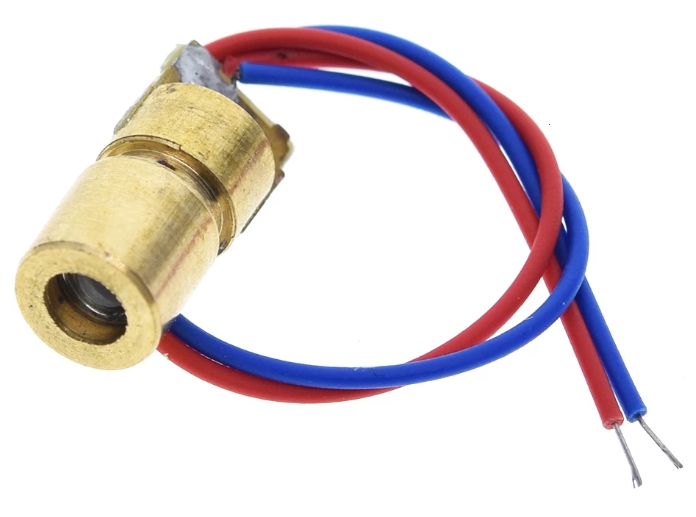

Code to place on the ESP:
This will connect to the MQTT broker and listens for messages on the servo/pan and tilt topic.
#include <ESP8266WiFi.h>
#include <PubSubClient.h>
#include <Servo.h>
Servo pan;
Servo tilt;

const char* ssid = "MYSSI";
const char* password = "MYWIFIPASS";
const char* mqtt_server = "IPMQTTBROKER";
const char* topic_pan = "servo/pan";
const char* topic_tilt = "servo/tilt";

WiFiClient espClient;
PubSubClient client(espClient);
long lastMsg = 0;
char msg[50];
int value = 0;

void setup() {
  pan.attach(D5);
  tilt.attach(D6);
  setup_wifi();
  client.setServer(mqtt_server, 1883);
  client.setCallback(callback);
}

void setup_wifi() {
  delay(5);
  WiFi.begin(ssid, password);

  while (WiFi.status() != WL_CONNECTED) {
    delay(500);
  }
}

void callback(char* topic, byte* payload, unsigned int length) {
 String string;
 for (int i = 0; i < length; i++) {
 string+=((char)payload[i]);
 }
 int pos = string.toInt();
 if ( strcmp(topic, topic_pan) == 0 ) {
 pan.write(pos);
 }
 if ( strcmp(topic, topic_tilt) == 0 ) {
 tilt.write(pos);
 }
 delay(15);
}

void reconnect() {
  while (!client.connected()) {
    if (client.connect("ESP8266Client")) {
      client.subscribe(topic_pan);
      client.subscribe(topic_tilt);
    } else {
      delay(5000);
    }
  }
}
void loop() {
  if (!client.connected()) {
    reconnect();
  }
  client.loop();
  delay(100);
}
Website PHP code:
This has some calibration code to get coordinates lined-up
<?Php
$foo_x=$_POST['foo_x'];
$foo_y=$_POST['foo_y'];
echo "X=$foo_x, Y=$foo_y ";
$x=160 - round($foo_x/30);
$y=38 - round($foo_y/100);

system('/usr/bin/mosquitto_pub -h 10.1.0.17 -t servo/pan -m "' . $x . '"');
system('/usr/bin/mosquitto_pub -h 10.1.0.17 -t servo/tilt -m "' . $y . '"');
?>
<form action='' method=post>
<input type="image" alt=' Finding coordinates of an image' src="worldmap.jpg"
name="foo" style=cursor:crosshair;/>
</form>
POC