Tag Archives: python

Extracting/converting old chats from Signal/ICQ/google

ICQ

For ICQ i only could find one that worked for me.
Search for the below file on the internet

IcqHR 1.8f (http://soft.softoogle.com/ap/icqhr-get-4581.shtml)

This will convert XXXXXmsg.dat to a html file.

SIGNAL

I’ve got signal on my linux workstation, so my encryption key lives in
~/.config/Signal/config.json

Install sqlcipher from (https://github.com/sqlcipher/sqlcipher)

And use below script (change paths/keys accordingly)

#!/bin/bash
#set -x
# Get your key from
#cat ~/.config/Signal/config.json
SIGNAL_KEY=XXXXXXXXXXXXXXXXXXXXXXXXXXXXXXXXXXXXXXXXXXXXXXXXXXXXXXXXXXXXXXXXXXXXX

/Projects/sqlcipher/sqlcipher -list -noheader /home/${USER}/.config/Signal/sql/db.sqlite "PRAGMA key = \"x'"${SIGNAL_KEY}"'\";select json from messages;" > /tmp/clear_text_msgs;
cd /tmp 
tail -n +2 clear_text_msgs > without_ok
sed '$!s/$/,/' without_ok > with_commas
sed '1 s/^/[\n/' with_commas > with_leading_bracket
echo "]" >> with_leading_bracket
rm without_ok
rm with_commas
mv with_leading_bracket valid.json
cp valid.json /home/%{USER}/signal.$(date +%Y%m%d)
cd -

Google Chat/Talk/Hangouts

Just search for google takeout!

After that convert Hangouts.json to text using
https://github.com/baldybeardedguy/hangouts-json-parser/blob/master/Hangouts_json.py

A sms gateway

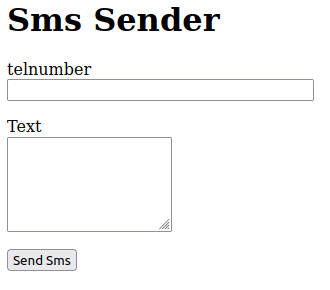
Sms form

Made a generic sms sender, for check_mk monitoring + sending password of accounts.
You can send sms by filling in a form, or using a url like:

http://smsgateway.local:8080/sms/0612341234/Message%20met%20spaties

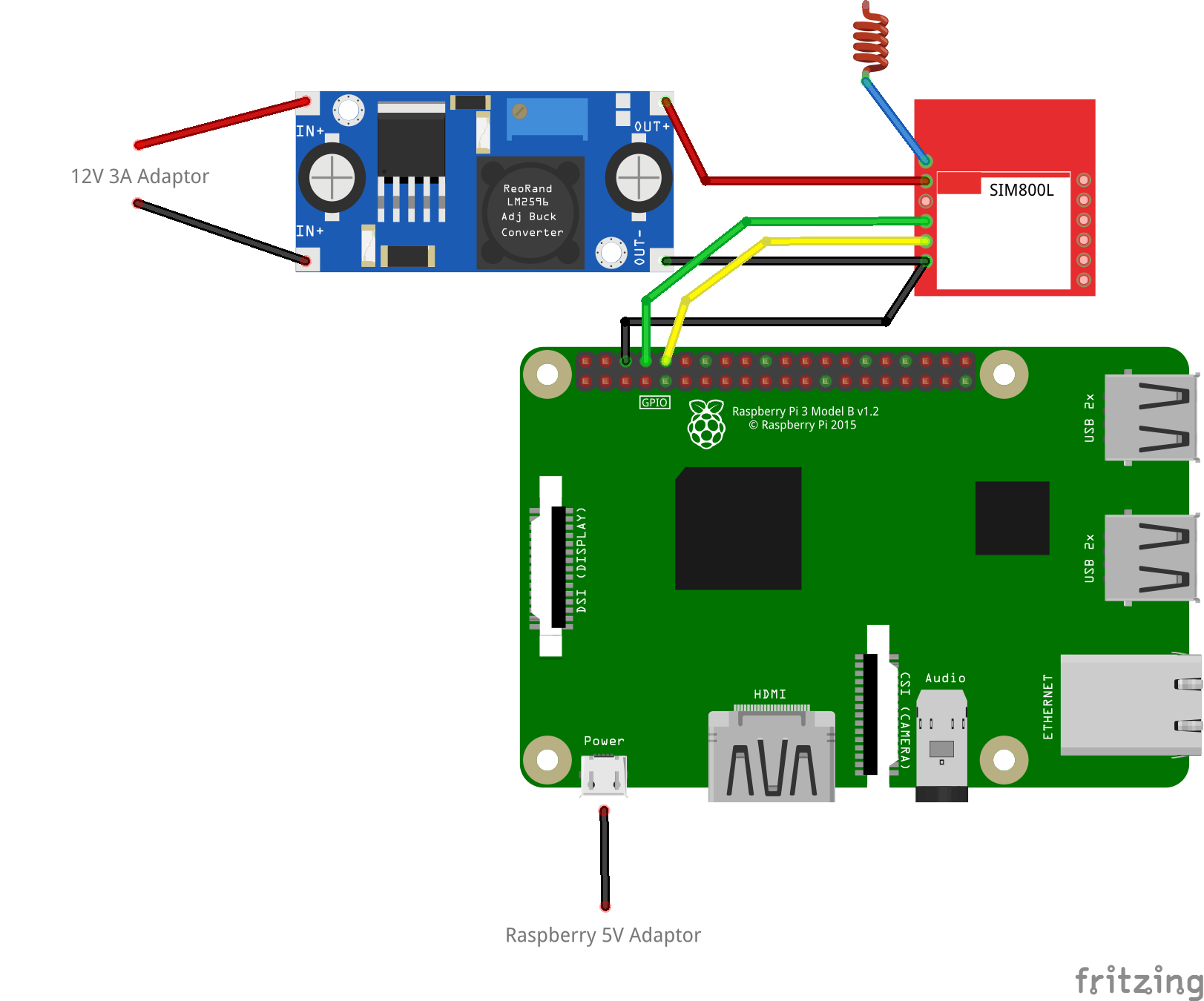
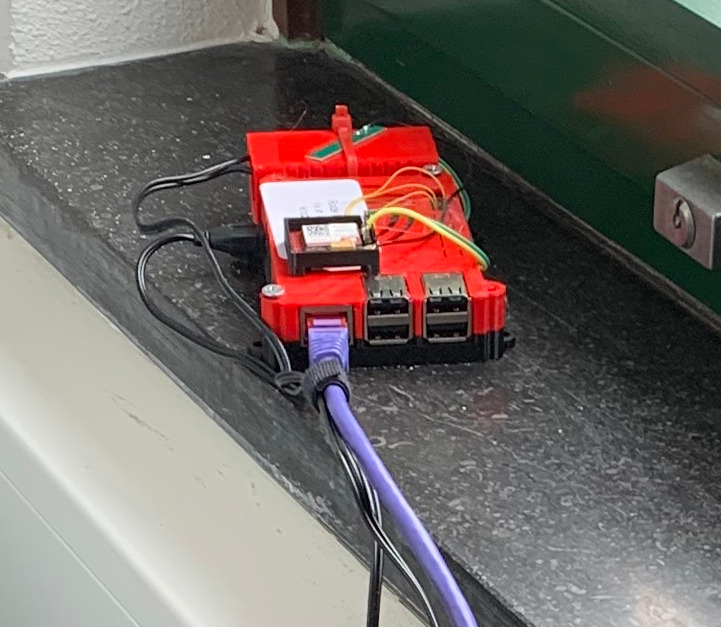
It uses a Raspberry and a sim800L module.

Fritzing schematic
At work in a corner near a window (3d printed case)

Remove pin from simcard fix:

sudo minicom -b 115000 -o -D /dev/serial0

 AT+CPIN?
+CPIN: SIM PIN

AT+CPIN=0000
OK

AT+CLCK=”SC”,0,”0000″
OK

AT+CPIN?
+CPIN: READY 

Cron

@reboot sh /home/pi/launcher.sh 

Launcher

cat /home/pi/launcher.sh
#!/bin/bash
cd /home/pi
while true; do
/usr/bin/python newapi.py
done

newapi.py (uses flask)

import serial
import RPi.GPIO as GPIO     
import os, time
import sys

from flask import Flask, render_template, request
app = Flask(__name__)

from flask_wtf import FlaskForm
from wtforms import StringField, PasswordField, BooleanField, SubmitField, TextAreaField
from wtforms.validators import DataRequired

from flask import render_template

app.config['SECRET_KEY'] = 'you-will-never-guess'

class FormForm(FlaskForm):
    telnumber = StringField('telnumber', validators=[DataRequired()])
    messagepart = TextAreaField('Text', render_kw={"rows": 5, "cols": 20})
    submit = SubmitField('Send Sms')
 
@app.route("/sms/<number>/<message>")
def action(number, message):
        num = number.encode() 
        mes = message.encode() 
	GPIO.setmode(GPIO.BOARD)   
	# Enable Serial Communication
	port = serial.Serial("/dev/serial0", baudrate=9600, timeout=1)

	# Transmitting AT Commands to the Modem
	# '\r\n' indicates the Enter key
	port.write('AT'+'\r\n')
	rcv = port.read(10)
	print rcv
	time.sleep(1)
	#port.write('ATE0'+'\r\n')      # Disable the Echo
	#rcv = port.read(10)
	#print rcv
	#time.sleep(1)
	port.write('AT+CMGF=1'+'\r\n')  # Select Message format as Text mode
	rcv = port.read(10)
	print rcv
	time.sleep(1)
	port.write('AT+CNMI=2,1,0,0,0'+'\r\n')   # New SMS Message Indications
	rcv = port.read(10)
	print rcv
	time.sleep(1)
	port.write('AT+CSCS="GSM"'+'\r\n')   
	rcv = port.read(10)
	print rcv
	time.sleep(1)
	# Sending a message to a particular Number
	port.write('AT+CMGS="'+num+'"\r\n')
	rcv = port.read(10)
	print rcv
	time.sleep(1)
	port.write(mes+'\r\n')  # Message
	rcv = port.read(10)
	print rcv
	port.write("\x1A") # Enable to send SMS
	for i in range(10):
	    rcv = port.read(10)
	    print rcv
        return 'OK'
@app.route("/form")
def form():
    form = FormForm()
    return render_template('web.html', title='Web Sms', form=form)
@app.route('/data', methods = ['POST', 'GET'])
def data():
    if request.method == 'GET':
        return "The URL /data is accessed directly. Try going to '/form' to submit form"
    if request.method == 'POST':
  
        telnumber = request.form['telnumber']
        messagepart = request.form['messagepart']
        num = telnumber.encode() 
        mes = messagepart.encode()
	GPIO.setmode(GPIO.BOARD)   
	# Enable Serial Communication
	port = serial.Serial("/dev/serial0", baudrate=9600, timeout=1)
	# Transmitting AT Commands to the Modem
	# '\r\n' indicates the Enter key
	port.write('AT'+'\r\n')
	rcv = port.read(10)
	print rcv
	time.sleep(1)
	#port.write('ATE0'+'\r\n')      # Disable the Echo
	#rcv = port.read(10)
	#print rcv
	#time.sleep(1)
	port.write('AT+CMGF=1'+'\r\n')  # Select Message format as Text mode
	rcv = port.read(10)
	print rcv
	time.sleep(1)
	port.write('AT+CNMI=2,1,0,0,0'+'\r\n')   # New SMS Message Indications
	rcv = port.read(10)
	print rcv
	time.sleep(1)
	port.write('AT+CSCS="GSM"'+'\r\n')   
	rcv = port.read(10)
	print rcv
	time.sleep(1)
	# Sending a message to a particular Number
	port.write('AT+CMGS="'+num+'"\r\n')
	rcv = port.read(10)
	print rcv
	time.sleep(1)
	port.write(mes+'\r\n')  # Message
	rcv = port.read(10)
	print rcv
	port.write("\x1A") # Enable to send SMS
	for i in range(10):
	    rcv = port.read(10)
	    print rcv
       
        return '<a href="/form">Nog een SMS sturen</a>'
@app.route("/checkmk")
def checkmk():
        # Enable Serial Communication
        port = serial.Serial("/dev/serial0", baudrate=9600, timeout=1)
   
        port.write('AT'+'\r\n')
        rcv1 = port.read(30)
        time.sleep(1)

        port.write('AT+CPAS'+'\r\n')
        rcv2 = port.read(30)        
        time.sleep(1)
    
        port.write('AT+CGREG?'+'\r\n')
        rcv3 = port.read(30)
        time.sleep(1)
    
        port.write('AT+CGATT?'+'\r\n')
        rcv4 = port.read(30)
        time.sleep(1)
    
        port.write('AT+CSQ'+'\r\n')
        rcv5 = port.read(30)
        time.sleep(1)

        return 'OK of niet' + rcv1 + rcv2 + rcv3 + rcv4 + rcv5
if __name__ == "__main__":
   app.run(host='0.0.0.0', port=8080, debug=True)

Lidar POC for Vincent

Using Python, Raspberry, a lidar module, a servo, display .. and a 3Dprinted holder.

Proof of concept was to see if it was easy to implement a lidar radar for boat navigation.

#!/usr/bin/env python
import math
import random
import pygame
from pygame.locals import *
import time
import serial
import pigpio

GPIO = 18
ser = serial.Serial("/dev/ttyUSB0", 115200)

pi = pigpio.pi()
distance = 0
pygame.init()
screen = pygame.display.set_mode((480, 320))
while True:
        screen.fill((0,0,0))
        pygame.draw.circle(screen, (0,128,0), (240,320), 100,1)
        pygame.draw.circle(screen, (0,128,0), (240,320), 200,1)
        pygame.draw.circle(screen, (0,128,0), (240,320), 300,1)
        for deze in range(10,170,5):
            count = ser.in_waiting
            if count > 8:
                    recv = ser.read(9)
                    ser.reset_input_buffer()
                    if recv[0] == 'Y' and recv[1] == 'Y': # 0x59 is 'Y'
                        low = int(recv[2].encode('hex'), 16)
                        high = int(recv[3].encode('hex'), 16)
                        global distance
                        distance = low + high * 256
            res = distance
            #print res
            x =  res * math.cos(math.radians(deze))
            y =  res * math.sin(math.radians(deze))
            xreal = x + 240
            yreal = 320 - y
            pygame.draw.line(screen, (0, 255, 0), (240, 320), (xreal, yreal))

            pygame.time.wait(15)
            pygame.display.flip()
            #print(res)
            pi.set_servo_pulsewidth(GPIO, deze * 11 + 500)
            time.sleep(0.2)
        screen.fill((0,0,0))
        pygame.draw.circle(screen, (0,128,0), (240,320), 100,1)
        pygame.draw.circle(screen, (0,128,0), (240,320), 200,1)
        pygame.draw.circle(screen, (0,128,0), (240,320), 300,1)
        for deze in range(170,10,-5):
            count = ser.in_waiting
            if count > 8:
                    #print count
                    recv = ser.read(9)
                    ser.reset_input_buffer()
                    if recv[0] == 'Y' and recv[1] == 'Y': # 0x59 is 'Y'
                        low = int(recv[2].encode('hex'), 16)
                        high = int(recv[3].encode('hex'), 16)
                        global distance
                        distance = low + high * 256
            res = distance
            x =  res * math.cos(math.radians(deze))
            y =  res * math.sin(math.radians(deze))
            xreal = x + 240
            yreal = 320 - y
            pygame.draw.line(screen, (0, 255, 0), (240, 320), (xreal, yreal))
            pygame.time.wait(15)
            pygame.display.flip()
            pi.set_servo_pulsewidth(GPIO, deze * 11 + 500)
            time.sleep(0.2)
#pi.set_servo_pulsewidth(GPIO, 0)