Category Archives: Photography

Movie stabilisation and music suggestions

Some suggestions/answers for some friends.

Movie stabilisation from action cams:

Mostly I use kdenlive, but if you have an actioncam which also records movement (pan, tilt, zoom, and rotation) use a tool like Gyroflow!
This will use the motion data to correct the movement!

https://userbase.kde.org/Kdenlive/Manual/Clip_Menu/Stabilize

I’ve tried Davinci Resolve also. But I’m not sure which i’ve used for below movies.

Using blender : https://www.youtube.com/watch?v=oCHjdEODrpM
OR https://www.youtube.com/watch?v=982RL4a899g

Me flying a Cessna 172
Arja on the Death Road in Bolivia (8x speed and stabilzed)

If you want even an easier way, upload to YT, stabilise and download you movie. 🙂

Something else, what music to listen to? Any suggestions?

I had to name some (most by heart), I will edit/alter this list.
The folk/pipes artists will be in a next post.

Heavier stuff:
The prodigy, nightwish, in extremo, tanzwut, after forever, faun, gathering, therion, withintemptation

Folky
Trolska polska, dervish, gaelic storm, lunasa, michael mcgoldrick, peatbog faeries, beoga

Jazzy folk
Borne and mcleod, Bees Knees (Hamish moore and dick lee)

Film music
Akira, Vangelis (bladerunner), Kill Bill music (all kinds of sources)

Electro
Junky-xl, Trentemoller, Alt-j, Avcii

Classical
Einaudi, ennio morricone, Paganini,Rondò Veneziano

Easy listening
Aereda, Andreas Vollenweider,Anuna, Clannad, Dead can danve, enya, Era, Lais, kitaro, Moya Brennan,omnia

Blues
BB King

Divers
Alva Noto and Ryuichi Sakamoto, Buddha bar, Buena Vista Social Club, Cafe del mar, Mark Knopfler, Easy Alohas

Indie
Kensington, Imagine Dragons, 77 bombay street, Mumford and Sons, Lumineers, Of monsters and men,

Scottish Rock
Runrig

Find other music/genre’s

Background switcher Ubuntu

I was playing around with Phantomjs a headless browser.
Using this as a scraper for a ajax enabled site.

After scraping a wallpaper site, I wanted to take the big pictures and display these as background.

First sort and resize to a better size.

Below does the following:

  • Image width larger than 1800 AND
  • Image height larger than 900
  • Resize to 1920×1080 ( enlarge or reduce size )
  • Not screen filling (portrait mode) ? Than add black bars on the side.
  • Place the image in wallpaper directory

Convert script, if you resize huge images beforehand, you safe cpu resources later.
You also can place other colors or even another background instead of black.

mkdir -p wallpaper
ls * | while read ; do
info=$(identify "$REPLY" | awk '{ print $3 }' 2>/dev/null)
height=$( echo $info | cut -f2 -dx)
width=$( echo $info | cut -f1 -dx)
if [ $width -gt 1800 ] && [ $height -gt 900 ] ; then
	convert -resize 1920x1080  -gravity center  -background black -extent 1920x1080 "$REPLY" "wallpaper/$REPLY"
fi
done

Set a random wallpaper as background using cron.

#!/bin/bash
DISPLAY=":0.0"
XAUTHORITY="/home/henri/.Xauthority"
XDG_RUNTIME_DIR="/run/user/1000"

cd /home/henri/Pictures/
getranpic=$(ls  wallpaper/ |sort -R |tail -1)
#gsettings set org.gnome.desktop.background picture-options 'wallpaper'
#Set different modes ( enum 'none' 'wallpaper' 'centered' 'scaled' 'stretched' 'zoom' 'spanned' )
gsettings set org.gnome.desktop.background picture-uri-dark  "$(realpath wallpaper/$getranpic)"
logger "$(realpath $getranpic)" 

Cron example

* * * * * DBUS_SESSION_BUS_ADDRESS=unix:path=/run/user/1000/bus /home/henri/bin/setrandom

Camera bags

I saw this article on Flipboard.

So true, we own several.

Am I happy with those? .. Well depends.

They all have their benefits. But I want the impossible.
One with all the benefits.
We choose the bag depending on the occasion, but for example a large bag is perfect for a far away vacation, sometimes we do daytrips which can be done with a smaller bag.
And I want an even smaller bag when going to the city to get something to eat when on holiday. Or the day trips to family or other cities in our country.

Also the means of transport matters.

Bike: Small one
Own car: Big bag and a small one
Plane: We have been all over the world, it depends on travel and transport in those countries.

I LOVE the ones with easy access. (Slingshot and mindshift)
Some of them have a way to take your tripod with you.

Sometimes we have to take two camera’s with us, so we don’t fight. (Vertex and Mindshift take two)

Lowepro Vertex 200 AW

Comes with a tripod holder, lots of pockets and easy adjustable. Plus it has a rain cover hidden in the bottom.

Hama

A real small bag. This one we use for day trips.
Holds camera plus a lens or our small binoculars.

Lowepro Slingshot Edge

This is another day trip bag. For when we need a little more room or take some food with us.
Love the sling concept, but not much used anymore.

Mindshift Gear Rotation 180 Horizon

I love this bag! We took this one with us to Peru and Bolivia.
Easy on the shoulders and back. I carried this one the whole day for several weeks.
The camera sling rests on your hips.

What we take with us in the big bags?

  • Filters: Polarisation/8x Stop filters + ring adaptors
  • My little screen magnifier
  • Many Sdcards
  • WD Passport for backup (see the New Zealand hack)
  • Multiple lenses
  • Cleaning material
  • Lens sunshades
  • Mini tripod
  • GPS tracker (To embed locations in photos)
  • Raincoat
  • Technochanter 🙂

A vacation in numbers and about taking pictures

Italy 2023

Pictures : 2633 mobile + 2425 dslr
Movies : 52

Highest point: 1214m (Vesuvius)
Lowest: -40m

Pizza’s eaten:
Too many ( sometimes 2 times a day), it was hard to get something else to eat besides Pizza and Pasta.


Oldest building : 500BC

Km walked: 220Km
Km driven: ? (calculating) Will update when i post something about unwritten traffic rules in Italy.

Types of transport: Plane, train, metro/subway, bus, scooter, bike, car, walking

Temperature high: 32
Temperature low: 16

About the photos .. it finally happened.
More mobile photos where taken than with our trusty Nikon!
(Read our New Zealand post, why trusty .. rain damage on both Mobile and Nikon D750)

Some data about longer trips since 2010

This has multiple reasons:

  • Coline took loads of mobile phone pictures.
    (I was mostly in charge of the Nikon)
    She is trigger happy ..
  • We didn’t take the big camera always with us at night, going for dinner.
  • Sometimes it was too hot for me to focus on taking good pictures.
  • I didn’t make panoramic and time-lapse photos.

Why still use dlsr?

  • Better sensors (larger image chip) Small image ICs give more cross noise due to the image pixelsensors being to close to each other)
    So more pixels does NOT equal better images!
  • More control over your settings.
  • Better lenses and faster. Better aperture equals better DOF!!
    (Depth of field)

Transform photos using gimp

Just back from my 3 week trip to Italy.
Made 5000-odd photos.
Using my posted scripts they are easily sorted.

But some are crooked, lets fix them.

Not a straight horizon:

Lets open this photo in Gimp

Easy to fix:

  • Open in Gimp
  • Go to measure tool
  • Orientation – auto and transform layer
  • Select the horizon on the left (do not release the mouse button) and draw to the right
  • Press straighten

Easy ..

Another fix below : Perspective

Sometimes you want to look straight at a picture, but when taking a picture there is something preventing this.

  • Other tourists won’t move away from a information sign, so you have to take the picture from an angle.
  • The image is far up a wall.
  • Or as in example below, the Roman mosaic is on the floor, no way to take a picture from above.

  • Open in gimp
  • Select from tools > Transform Tools
  • Handle transform or press SHIFT-L
  • Select a corner and drag, repeat until satisfied

Kodi push pictures/directory from website

For a new project i’m using parts of my Photo Manager.

UPDATE: Random photo push from directory in one script.

I will post the Minimal code for the following:

  • Caching thumbnail generation
  • Drag and drop image for displaying on a kodi instance
  • Button to start slideshow of a directory
  • Open image in browser with obfuscated image url (not shown in movie)
  • Stop image playing

Json RPC used:

# Playing a single file
curl -H "content-type:application/json" -i -X POST -d '{"jsonrpc":"2.0","id":1,"method":"Player.Open","params":{"item":{"file":"'.$dir2.'"}}}' http://KODI-IP:8080/jsonrpc &';

# Playing a directory
curl -H "content-type:application/json" -i -X POST -d '{"jsonrpc":"2.0","id":1,"method":"Player.Open","params":{"item":{"directory":"/path/'.$dir.'"}}}' http://KODI-IP:8080/jsonrpc &';

# Stop playing (i'm stopping player 1 and 2) You can query which player is active, this works also 
curl -H "content-type:application/json" -i -X POST -d '{"jsonrpc": "2.0", "method": "Player.Stop", "params": { "playerid": 1 }, "id": 1}' http://10.1.0.73:8080/jsonrpc';
Kodi enable http control and disable authentication (if you want to use authentication, change the curl commands accordingly)

Below the multiple PHP files, i’ve removed a lot of code specific for my manager.

By the way, I love this trick:

header("HTTP/1.1 204 NO CONTENT");

I’ve you put this in the top of your php script which is linked from the first page, you won’t open this link in your browser, but it gets executed nevertheless!

::::::::::::::
push.php
::::::::::::::
<!DOCTYPE html>
<html>
<head>
</head>
<body>

<div id="dropbox">Drop Image</div><br>
<a href="playpush.php?dir=TEMP/Sake">playdir</a> 
<a href="stoppush.php">stop</a> 

# Here i have a generated part to list my photoalbum photos in this format

<a href='getimg.php?imagepath=/mnt/fileserver/TEMP/1.jpg'><img src='getimg2.php?imagepath=/mnt/fileserver/TEMP/1.jpg' width=300 title='1.jpg'></a>
<a href='getimg.php?imagepath=/mnt/fileserver/TEMP/2.jpg'><img src='getimg2.php?imagepath=/mnt/fileserver/TEMP/2.jpg' width=300 title='2.jpg'></a>

<script
    type="text/javascript"
    src="javascript2.js"
    
  ></script>
</body></html>
::::::::::::::
getimg.php - Displays photo in browser (forgotten in movie)
::::::::::::::
<?php
Header("Content-Type: image/jpeg"); 
$file = $_GET['imagepath'];
$file = str_replace("%20", "\ ", $file);
$file = str_replace("(", "\(", $file);
$file = str_replace(")", "\)", $file);
$log =  'imggetlog';
file_put_contents($log, $file, FILE_APPEND);
file_put_contents($log, "\n\r", FILE_APPEND);
header('Content-Length: ' . filesize($file));
readfile($file);
?>

::::::::::::::
getimg2.php - makes a caching thumbnail 
/long/image/path/to/photo.jpg -> cachedir/longimagepathtophoto.jpg
::::::::::::::
<?php
Header("Content-Type: image/jpeg"); 
$file = $_GET['imagepath'];
$file = str_replace("%28", "\(", $file);
$file = str_replace("%29", "\)", $file);
$file = str_replace("%20", "\ ", $file);

$cachename = str_replace("/", "", $file);
$cachename = str_replace(" ", "", $cachename);
$cachename = "cachedir/$cachename";
$log =  'imggetlog';
file_put_contents($log, $file, FILE_APPEND);
file_put_contents($log, "\n\r", FILE_APPEND);
if (!file_exists("$cachename")) {

exec("convert -resize 300x300 \"$file\" \"$cachename\"");
}
header('Content-Length: ' . filesize("$cachename"));
readfile("$cachename");
?>

::::::::::::::
playpush.php - Pushes DIRECTORY play to Kodi
::::::::::::::
<?PHP
header("HTTP/1.1 204 NO CONTENT");

header("Cache-Control: no-cache, no-store, must-revalidate"); // HTTP 1.1.
header("Pragma: no-cache"); // HTTP 1.0.
header("Expires: 0"); // Proxies.

$dir=$_GET['dir'];

$command='nohup curl -H "content-type:application/json" -i -X POST -d \'{"jsonrpc":"2.0","id":1,"method":"Player.Open","params":{"item":{"directory":"/mnt/fileserver/'.$dir.'"}}}\' http://IPKODI:8080/jso
nrpc &';
exec($command, $output, $retval);
?>

::::::::::::::
stoppush.php - stops displaying
::::::::::::::
<?PHP
header("HTTP/1.1 204 NO CONTENT");

header("Cache-Control: no-cache, no-store, must-revalidate"); // HTTP 1.1.
header("Pragma: no-cache"); // HTTP 1.0.
header("Expires: 0"); // Proxies.

$command='curl -H "content-type:application/json" -i -X POST -d \'{"jsonrpc": "2.0", "method": "Player.Stop", "params": { "playerid": 1 }, "id": 1}\' http://IPKODI:8080/jsonrpc';
exec($command, $output, $retval);
$command='curl -H "content-type:application/json" -i -X POST -d \'{"jsonrpc": "2.0", "method": "Player.Stop", "params": { "playerid": 2 }, "id": 1}\' http://IPKODI:8080/jsonrpc';
exec($command, $output, $retval);
?>
::::::::::::::
javascript2.js
::::::::::::::
function getAllElementsWith(tag, attribute, value)
{
  var matchingElements = [];
  var allElements = document.getElementsByTagName(tag);
  for (var i = 0; i < allElements.length; i++)
  {
    if (value.indexOf(allElements[i].getAttribute(attribute)) != -1)
    {
      // Element exists with attribute. Add to array.
      matchingElements.push(allElements[i]);
    }
  }
  return matchingElements;
}

// onDrop
function onDrop(evt) {
    evt.stopPropagation();
    evt.preventDefault();
    var imageUrl = evt.dataTransfer.getData("URL");
    var links = getAllElementsWith("a", "href", imageUrl);
    var image;
     console.log(links, evt);
    
    if(links.length){
        image = links[0].getElementsByTagName("img");
        if(image.length)
            imageUrl = image[0].getAttribute("src");
        else
            imageUrl = "#no-image";
    }
    
///    alert(imageUrl);
var res = imageUrl.replace(/getimg/, "pushplay2");

location.href = (res);

};

// onDragOver
function onDragOver(evt){
    evt.preventDefault();
}

var dropbox = document.getElementById('dropbox');
dropbox.addEventListener('drop', onDrop);
dropbox.addEventListener("dragover", onDragOver, false);

Random picture push

file=$(find /mnt/fileserver/examples -type f  | shuf | head -1)
post_data="{\"jsonrpc\":\"2.0\",\"id\":1,\"method\":\"Player.Open\",\"params\":{\"item\":{\"file\":\"$file\"}}}"
curl --user user:pass  -H "content-type:application/json" -i -X POST --data "${post_data}" http://KODI-IP:8080/jsonrpc

Below a example of what your can do with the code above

Quick previewing negatives using OBS

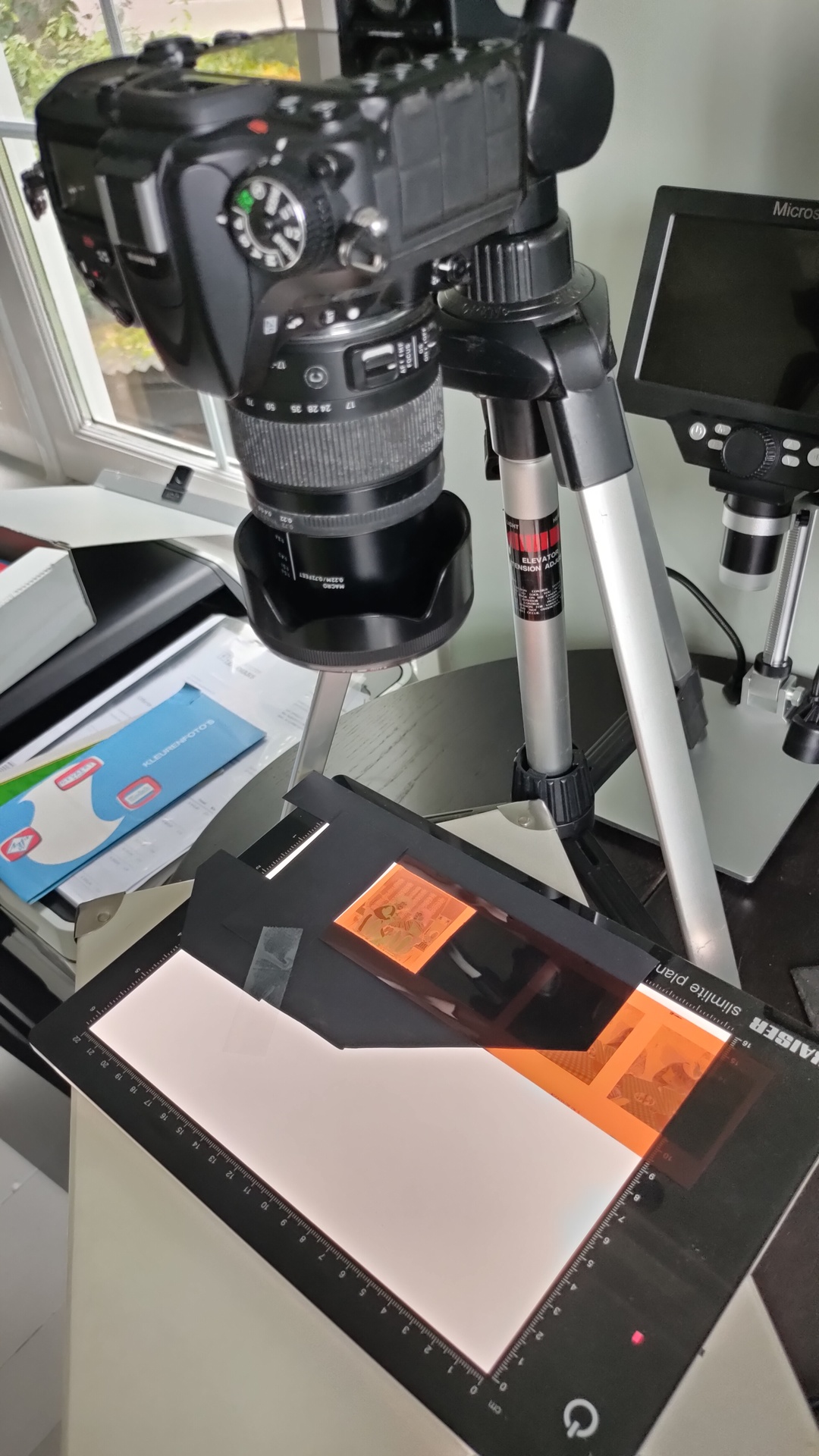
I’m using a camlink to connect a Nikon camera to my PC, but you could use your webcam also for this trick.

Now i can activate the full screen projector in OBS to preview and sort the negatives on a big screen. (right click on you preview screen)

When connecting a camera to OBS you initially have a “negative” image.

Below trick inverts your image, after that you can use your camera controls or OBS colour correction filter to adjust.

I’m using gimp to invert the LUT png image, but most image editors can invert an image.

A LUTs is a LookUp Table. Color presets/filters for adjusting the image.

Hardcore method .. command line

convert input.png -channel RGB -negate invert.png

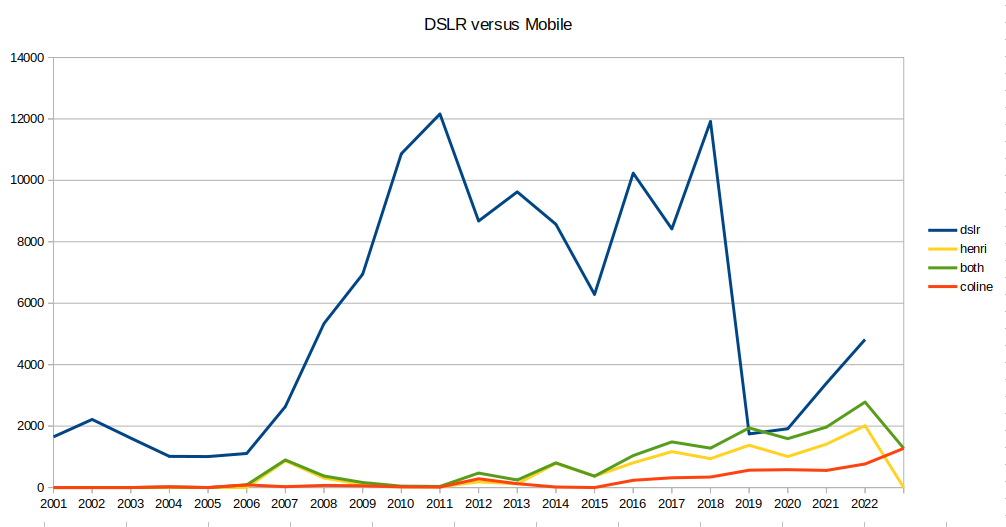
DLSR Camera versus Mobile Phone

Not talking about the quality but how much we are using the camera’s.

Reason for taking pictures:

  • Capture memorable events – DLSR
  • Simple snapshots to remember stuff – Mobile
  • HQ photos – shoots etcetera – you want to use DOF, a mobile can´t do this
  • Images for web/mattermost/whatsapp – mobile phone is sufficient

But we always take our phone with us … sometimes we forget to bring the Nikon to memorable events.

A simple count of pictures on my fileserver.

# Below creates a CSV file
for f in $(seq 2000 2022) ; do echo -n $f, ; find  */$f -type f 2>/dev/null | wc -l  ;done 

Notes:

2010 – We bought a new nikon
2019 – Busy planning buying a new house
2020,2021 – Covid
< 2010 – Mobile pictures are potato quality

I had my first android phone in 2009.
Phones before 2010 didn´t have good exif information, so the picture count is a little off in the graph above.

Two minute timelapse of oyster mushrooms growing.

#!/bin/bash
# capture images from Foscam ( 5 minute interval )
while true; do
wget -q "http://IP-WEBCAM:88/cgi-bin/CGIProxy.fcgi?cmd=snapPicture2&usr=adminuser&pwd=adminpass" -O $(date +%Y%m%d%H%M).jpg
sleep 300
done

# from jpg to mp4
ffmpeg -f image2 -r 24 -pattern_type glob -i '*.jpg'   -vcodec libx264 -profile:v high444 -refs 16 -crf 0 -preset ultrafast -vf scale=1920:1080 paddo.mp4

If your ipcam can’t add timestamps, use below part to add text (replace in above script)

...
...
wget -q "http://IP-WEBCAM:88/cgi-bin/CGIProxy.fcgi?cmd=snapPicture2&usr=adminuser&pwd=adminpass" -O /tmp/1.jpg
convert -fill white -pointsize 30 -draw "text 10,30 '$(date)'" /tmp/1.jpg $(date +%Y%m%d%H%M).jpg
rm -f /tmp/1.jpg 
...
...

Automatic photo sorting with Gps location lookup

We take a lot of pictures, with our Nikon camera and our mobile phones.

(Apparently in 2019 5544 pictures)

Some stats

757 20190803 - on a single day (Holiday)

Average pictures per month
locate "/2019/" | egrep -i "photoalbum|gsm" | egrep -i "mp4$|jpg$" | grep -Eo '2[[:digit:]]{3}[[:digit:]]{2}[[:digit:]]{2}' | cut -c-6 |sort | uniq -c | sort -n | awk '{ sum += $1; n++ } END { if (n > 0) print sum / n; }'
461

Besides android pictures being automatically uploaded to our nextcloud, I’m using some apps and scripts to get pictures and movies stored on my fileserver. (bash scripts/andftp)

For sorting those media files, i made a sorting script.
(Today I added a location sorting addition using GPS information stored in the exif information.

  • jpg and jpeg (add your own extentions)
  • mp4 and mov (for mobile and nikon)
  • Sorts by camera model/year/date/location
  • tries to extract date from filename when not found in exifinfo
  • Sorts whatsapp media
  • Sorts Raw

INSTALLING

pip3 install reverse_geocoder
You need python3, exiftool, exiftime and mediainfo

copy below python script in ~/bin/reverse2.py

( need more info? change last print entry admin1/admin2)
[{‘lat’: ‘-39.45556’, ‘lon’: ‘173.85833’, ‘name’: ‘Opunake’, ‘admin1’: ‘Taranaki’, ‘admin2’: ‘South Taranaki District’, ‘cc’: ‘NZ’}]

import reverse_geocoder as rg
import sys

lat=sys.argv[1]
lon=sys.argv[2]

coordinates = (lat,lon)

results = rg.search(coordinates) # default mode = 2


#print (results)

for entry in results:
    print(entry['name'] + "(" +  entry['cc'] + ")")

And a bash script /usr/local/bin/exifsort.sh

#!/bin/bash
#set -x

reversepath=/home/henri/projects/reversegeo/reverse2.py

#RAW
rawcnt=`ls | grep -i  nef$ | wc -l`
if [ "$rawcnt" = "0" ] ; then
echo "no raw"
else
mkdir raw 2>/dev/null
ls | grep -i nef$ | while read ; do mv $REPLY raw ; done
fi


ls | egrep -i "jpg$|jpeg" | while read ; do 
 	location=""	
	getmodel=$(exiftool "$REPLY" |grep "Make " | awk '{ print $3 }')
	if [ "$getmodel" != "" ] ; then 
		getmodel=$getmodel/
	fi
	echo "$REPLY" | grep WA0 >/dev/null && getmodel=whatsapp/

	gpsinfo=$(exiftool -c "%+.6f" "$REPLY" |grep "GPS Position" | cut -d":" -f2 | tr -d ' ' | sed s/,/\ /g)
	if [ "$gpsinfo" != "" ] ; then 
		location=$(python3 $reversepath $gpsinfo | grep -vi load | sed s/\(NL\)//g)
	fi
	dater=$(exiftime "$REPLY" 2>/dev/null | egrep "Created|Digitized" | sed s/Digitized/Created/g | tail -1  | cut -c 16-19,21,22,24,25)
	if [ "$dater" = "" ] ; then 
#		echo "Trying from filename"
		dater=$(echo $REPLY | grep -Eo '2[[:digit:]]{3}-[[:digit:]]{2}-[[:digit:]]{2}')

		if [ "$dater" = "" ] ; then 
#			echo "Trying from filename - maybe without dashes"
			dater=$(echo $REPLY | grep -Eo '2[[:digit:]]{3}[[:digit:]]{2}[[:digit:]]{2}')

		fi
	fi
	if [ "$dater" != "" ] ; then 
		year=$(echo $dater | cut -c-4)
		mkdir -p "${getmodel}$year/${dater}/$location"
		mv "$REPLY" "${getmodel}${year}/${dater}/$location"
	else
		mkdir -p "${getmodel}unknowndate/$location"
		mv "$REPLY" "${getmodel}unknowndate/$location"
      	fi
done

ls | egrep -i "mov$|mp4$" | while read ; do 
	
 	location=""	
	getmodel=$(exiftool "$REPLY" |grep "Make " | awk '{ print $3 }')
	if [ "$getmodel" != "" ] ; then 
		getmodel=$getmodel/
	fi

	echo "$REPLY" | grep WA0 >/dev/null && getmodel=whatsapp/
	gpsinfo=$(exiftool -c "%+.6f" "$REPLY" |grep "GPS Position" | cut -d":" -f2 | tr -d ' ' | sed s/,/\ /g)
	if [ "$gpsinfo" != "" ] ; then 
		location=$(python3 $reversepath $gpsinfo | grep -vi load | sed s/\(NL\)//g)
	fi
	dater=$(mediainfo "$REPLY" | grep Encode | tail -1 | cut -f2- -d:  | cut -f3 -d" " | sed s/-//g)
	if [ "$dater" = "" ] ; then 
#		echo "Trying from filename"
		dater=$(echo $REPLY | grep -Eo '2[[:digit:]]{3}-[[:digit:]]{2}-[[:digit:]]{2}')

		if [ "$dater" = "" ] ; then 
#			echo "Trying from filename - maybe without dashes"
			dater=$(echo $REPLY | grep -Eo '2[[:digit:]]{3}[[:digit:]]{2}[[:digit:]]{2}')

		fi
	fi
	if [ "$dater" != "" ] ; then 
		year=$(echo $dater | cut -c-4)
		mkdir -p "${getmodel}$year/${dater}/$location"
		mv "$REPLY" "${getmodel}${year}/${dater}/$location"
	else
		mkdir -p "${getmodel}unknowndate/$location"
		mv "$REPLY" "${getmodel}unknowndate/$location"
      	fi
done

Example running in a directory with mixed media

# Raw images get moved into a RAW directory
no raw

# Samsung phone detected with date and GPS location
mkdir -p samsung/20220717/Hilversum
mv 20220717_133453.jpg samsung/20220717/Hilversum

# OnePlus phone
mkdir -p OnePlus/20021208/Voorburg
mv IMG_20190109_091825.jpg OnePlus/20021208/Voorburg

# Realme (Added country when not NL)
mkdir -p realme/20220607/Isle of Islay(GB)
mv IMG20220607213630.jpg realme/20220607/Isle of Islay(GB)

# Whatsapp has no date embedded so it gets it from filename
Trying from filename
Trying from filename - maybe without dashes
mkdir -p whatsapp/20221021/
mv IMG-20221021-WA0000.jpg whatsapp/20221021/

# Nikon without GPS
mkdir -p NIKON/20220613/
mv DSC_1423.MOV NIKON/20220613/

# Whatsapp video without exif
mkdir -p whatsapp/20170528/
mv VID-20170528-WA0006.mp4 whatsapp/20170528/

# No camera name detected in exif from mobile movie
mkdir -p 20190114/Maarssen
mv VID_20190114_142455.mp4 20190114/Maarssen

# Location in mp4
mkdir -p 20220607/Lamlash(GB)
mv VID20220607155044.mp4 20220607/Lamlash(GB)

Result

./NIKON/2022/20220613/DSC_1423.MOV
./NIKON/2022/20220610/750_1101.JPG
./realme/2022/20220818/Hilversum/IMG20220818203825.jpg
./realme/2022/20220607/Isle of Islay(GB)/IMG20220607213630.jpg
./2019/20190114/Maarssen/VID_20190114_142455.mp4
./whatsapp/2017/20170528/VID-20170528-WA0006.mp4
./whatsapp/2022/20221021/IMG-20221021-WA0000.jpg
./2022/20220607/Lamlash(GB)/VID20220607155044.mp4
./2022/20220516/Hilversum/VID20220516125913.mp4
./OnePlus/2002/20021208/Voorburg/IMG_20190109_091825.jpg
./samsung/2022/20220717/Hilversum/20220717_133453.jpg

You could automate this using incrond
apt-get install incron
add your user to /etc/incron.allow
incrontab -e
add

/fileserver/mediain/ IN_CREATE /usr/local/bin/sortmymedia.sh
Coping a file in the directory, auto sort and move to correct location

sortmymedia.sh

#!/bin/bash
cd /home/user/media
/usr/local/bin/exifsort.sh